Microsoft Defender Antivirus keeps an individual Windows PC safe from malware, and it does that job well. Microsoft Defender for Business extends protection across a team's PCs, Macs, and phones, with central management and detection and response tools, making it a good fit for many small businesses.
But is Defender for Business or a dedicated small-business suite like Kaspersky Small Office Security the better fit? This article compares the two on coverage, management, and test results, so you can decide which one your small business needs.
Can a small business rely on Microsoft Defender alone?
A sole proprietor on one Windows laptop may be covered by Microsoft Defender Antivirus. But a team with several devices, shared data usually needs a business product such as Microsoft Defender for Business or Kaspersky Small Office Security.
Microsoft Defender Antivirus addresses malware and other threats on Windows devices. It does not cover accounts, passwords, business data, recovery, or security management, and it does not protect Macs or phones.
Use the questions below to check where your current setup stands:
|
What to consider |
Questions to ask |
|
Threat protection |
Are devices protected against malware, ransomware, malicious websites, phishing, and other common threats? |
|
Employees and accounts |
Are employee accounts protected with appropriate access controls and MFA, and can staff recognize common scams and phishing attempts? |
|
Devices |
Are all work devices and operating systems consistently protected? |
|
Business data |
Is business data protected, backed up, and recoverable if something goes wrong? |
|
Management |
Can security be deployed, monitored, updated, and maintained without excessive administration? |
|
IT resources |
Does the security setup match the time and expertise available within the business? |
- Microsoft Defender Antivirus is built into Windows and provides real-time malware protection at no extra cost.
- Defender for Business is a paid subscription that adds endpoint detection and response, central management, and Mac and mobile coverage.
- In SE Labs' April to June 2026 small business test, Kaspersky Small Office Security scored 100% Protection Accuracy and blocked all 25 targeted attacks. Microsoft Defender Antivirus (enterprise) scored 96% and was compromised by two of them.
- Antivirus alone does not cover weak passwords, stolen credentials, or recovery after a ransomware attack. KSOS also includes additional tools such as a password manager, VPN, and file encryption, while Defender for Business focuses primarily on endpoint security.
- Compare the complete set of tools you would run, and the time needed to manage them, not antivirus features on their own.
What protection does Microsoft Defender provide for small businesses?
Microsoft Defender Antivirus, free with every Windows PC, protects against malware, ransomware, and spyware. Microsoft Defender for Business, a paid subscription, adds threat detection and response, vulnerability management, central management, and coverage for Macs and mobile devices.
What does Microsoft Defender Antivirus cover?
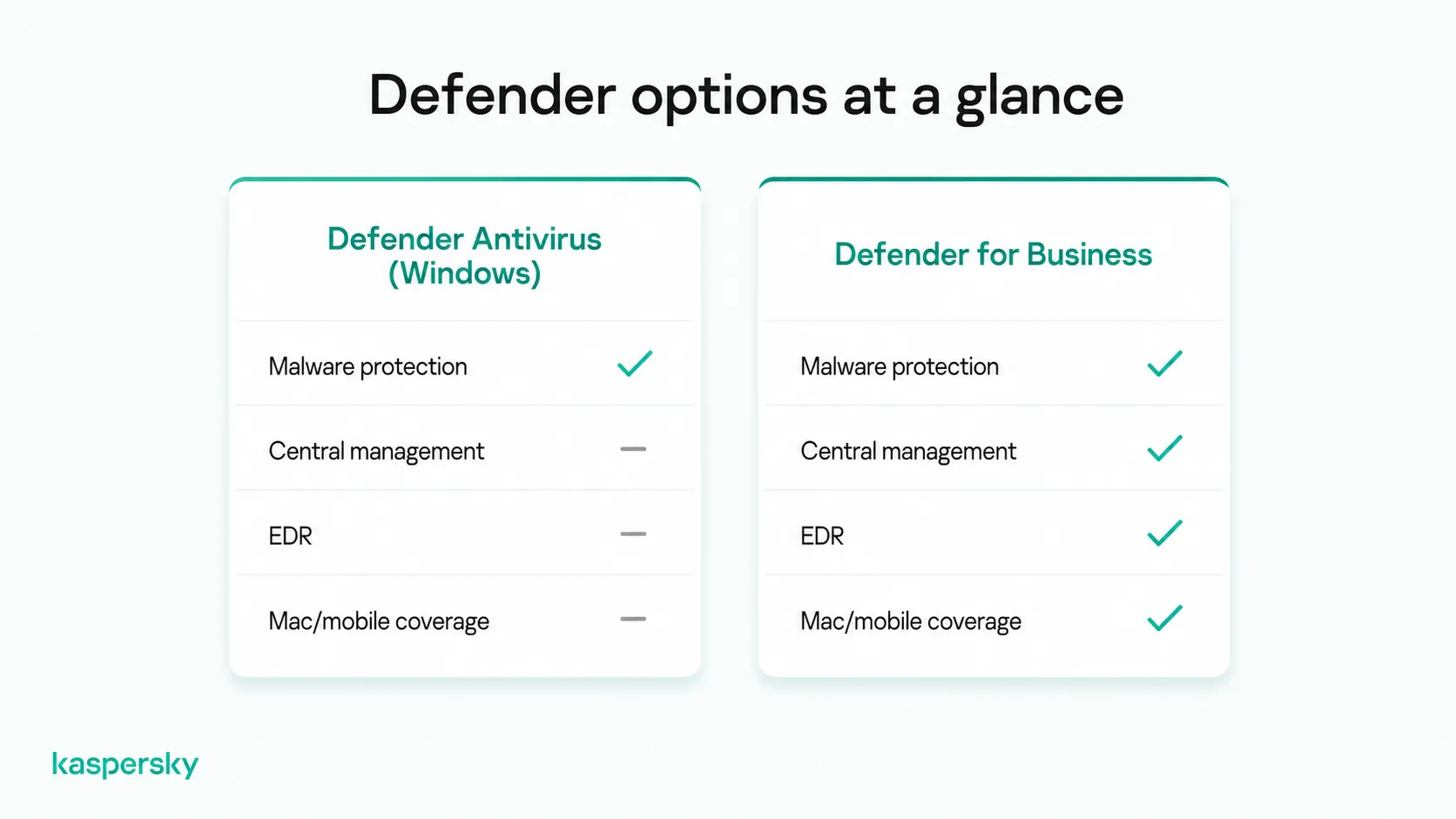
Microsoft Defender Antivirus protects Windows PCs against malware, ransomware, and spyware using real-time scanning, behavioral monitoring, heuristic analysis, and cloud-delivered protection. It is free, on by default in Windows.
When it finds a file it does not recognize, it sends the file details to Microsoft's cloud, which returns a verdict in seconds. That means new malware can be blocked before Microsoft has written a signature for it. Defender steps aside only when another antivirus takes over.
What does Defender for Business add?
Defender for Business is Microsoft's paid endpoint security subscription for up to 300 users. It adds endpoint detection and response, automated investigation and remediation, vulnerability management, attack surface reduction rules, and a single management console on top of Defender Antivirus.
Its antivirus component is Microsoft Defender Antivirus, the same engine described above, run with enterprise settings. The additional layers are:
- Endpoint detection and response(EDR): this watches for suspicious behavior that a file scan alone would not catch, and records what a device did before, during, and after an alert. If a laptop runs a malicious script, you can trace which files and systems it touched and cut the device off from the network.
- Automated investigation and remediation: Defender for Business can quarantine files and stop malicious processes without waiting for someone to step in.
- Vulnerability management: the console lists out-of-date software and known vulnerabilities across your devices and ranks what to fix first.
- Attack surface reduction rules: these block common attack behavior, such as an Office document launching a program or a script running from an email attachment (works only on Windows).
Which devices does Defender for Business support?
Defender for Business supports Windows, Mac, Android, and iOS/iPadOS devices, with up to five per user license. All report to the Microsoft Defender portal, though enrolling Macs and phones usually requires Intune (included in Microsoft 365 Business Premium).
The standalone Defender for Business license does not include Intune, and some capabilities differ by platform. This is important to keep in mind because the least protected device sets the level of protection for the whole business: a phone with company email on it is as useful an entry point as an office PC.
What protection does a small business actually need?
A small business needs security software on every device, including Macs and phones; unique passwords with multi-factor authentication on every account; backups with a tested restore; and one person responsible for keeping all of it running.
When security software is not managed, updates are not run and alerts go unanswered. That is why businesses without an IT team are often best served by a product that needs little attention.
Which cyberthreats should small businesses protect against?
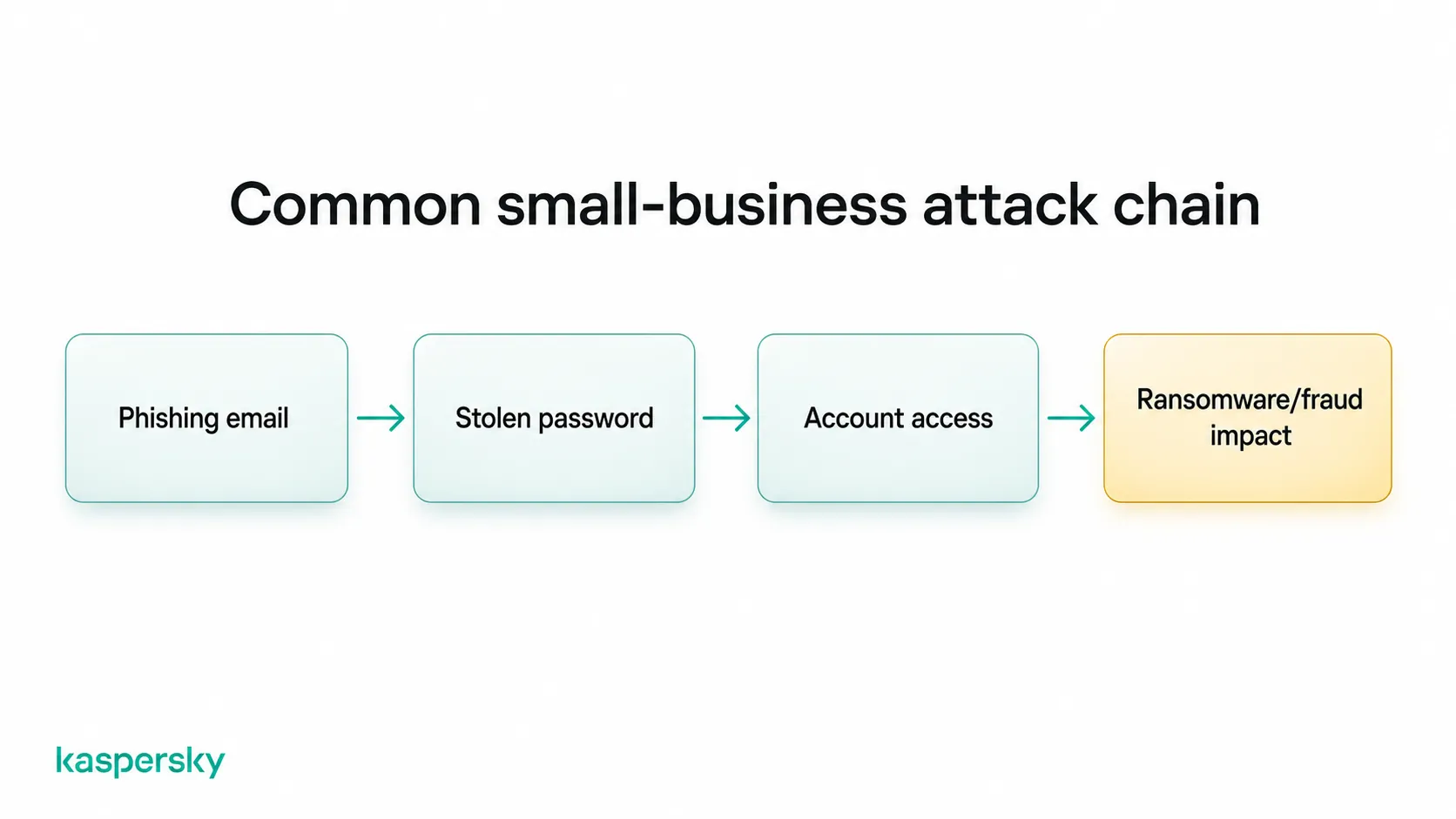
Small businesses should protect against malware, ransomware, phishing, malicious websites, stolen passwords, targeted attacks, and out-of-date software. Most incidents combine several of these at once, such as a phishing email that installs a keylogger.
The most common threats are:
- Malware and malicious downloads: these typically arrive through downloads, email attachments, and USB drives.
- Ransomware: this encrypts your files and demands payment to unlock them, and is often the type of attack that does the most damage.
- Phishing: this needs no malware at all. A convincing email imitating your bank, accounting software, or a supplier invoice persuades an employee to enter their password on a fake login page.
- Credential theft and account compromise: once an attacker has a working password for email or a cloud service, there is little left for antivirus to detect. They can read invoices, reset other passwords, and email customers from a real company address.
- Targeted attacks: an attacker combines a phone call or email, a legitimate remote support tool, and standard system commands into a sequence where no single step looks malicious. SE Labs describes this pattern as the main reason endpoint products fail: they recognize malware but not the sequence.
- Spyware and keyloggers: these run in the background and record what people type, including online banking logins and customer records.
- Out-of-date software: a browser or plugin that is months behind on updates may let a malicious website install code without the user clicking anything.
- Remote work: this adds home routers, personal laptops, and public Wi-Fi, any of which may have security weaknesses.
How should devices, accounts, and data be protected?
Every work device needs security software, every account needs a unique password and multi-factor authentication, and every important file needs a backup that has been tested. In practice, that means:
- A password manager: people reuse passwords when they have to remember them, and one reused password can turn a breach at an unrelated website into access to your company email.
- Multi-factor authentication on email and cloud accounts: it blocks most login attempts even when the password has already been stolen.
- Automatic updates on operating systems, browsers, and business applications: they close known gaps faster than anyone doing it by hand.
- Access limited to each job: give each person only the files and systems their work needs, so a compromised account exposes one role rather than the whole business.
- Regular phishing examples: phishing emails copy real invoice threads and supplier names, and people who have seen recent examples are more likely to spot them.
- Backups with one copy offline: ransomware encrypts every drive and shared folder it can reach, including a USB disk left plugged in. Keep one copy unplugged or in cloud storage with a separate login, and restore a few files from it every few months to confirm it works.
How does Kaspersky Small Office Security compare with Microsoft Defender?
In SE Labs' latest small business test, Kaspersky Small Office Security outperformed Microsoft's antivirus engine on protection. It also includes password, VPN, and encryption tools that Defender for Business does not, while Defender for Business retains an advantage in EDR and team size capabilities.
What did independent testing show?
SE Labs tested five small business endpoint products between April and June 2026. Kaspersky Small Office Security scored 100% Protection Accuracy and blocked all 25 targeted attacks. Microsoft Defender Antivirus (enterprise) scored 96% and was compromised by two targeted attacks.
Each product faced the same 100 threats: 75 public email and web threats that were live on the internet during the test, and 25 targeted attacks that followed a full attack chain from initial contact through to credential theft. Each product also had to handle 100 legitimate applications and websites without blocking them. All products ran on their vendor's recommended settings.
|
Product tested |
Protection Accuracy |
Targeted attacks blocked |
Legitimate Accuracy |
Total Accuracy |
|
Kaspersky Small Office Security |
100% |
25 of 25 |
100% |
100% |
|
Sophos Endpoint Security |
98% |
24 of 25 |
100% |
99% |
|
Bitdefender Small Office Security |
98% |
23 of 25 |
100% |
99% |
|
Microsoft Defender Antivirus (enterprise) |
96% |
23 of 25 |
100% |
99% |
|
Webroot SecureAnywhere Endpoint Protection |
76% |
15 of 25 |
100% |
91% |
Source: SE Labs, Security Evaluation Test Report: Small Business Endpoint Security (Protection), April to June 2026. Kaspersky, Sophos, Bitdefender, and Microsoft received AAA awards; Webroot received AA.
For a small business there are three key things to look at here:
- Kaspersky, Sophos, Bitdefender, and Microsoft all stopped every public threat, so on everyday malware the four leading products are equivalent.
- Kaspersky Small Office Security blocked all 25 targeted attacks, while Microsoft Defender Antivirus (enterprise) blocked 23 of 25.
- All products scored 100% on legitimate software, so Kaspersky's stronger protection did not come at the cost of false positives.
It’s important to note that SE Labs tested Microsoft Defender Antivirus in its enterprise configuration, which is the antivirus engine inside Defender for Business, not the complete Defender for Business service. The EDR and automated remediation layers were not part of the tested product, and they may catch some of what the engine missed.
How do the two business products compare?
Kaspersky Small Office Security includes a password manager, VPN, encryption, and a console built for businesses without IT staff. Microsoft Defender for Business includes EDR and vulnerability management, supports up to 300 users, and suits Microsoft 365 Business Premium customers.
Here are the two products side by side using SE Labs results and information from their product pages:
|
Kaspersky Small Office Security |
Microsoft Defender for Business |
|
|
Protection (SE Labs, Q2 2026) |
100% Protection Accuracy; all 25 targeted attacks blocked |
Antivirus engine tested as Microsoft Defender Antivirus (enterprise): 96% Protection Accuracy; 23 of 25 targeted attacks blocked |
|
Devices covered |
Windows PCs, Macs, Android and iOS devices, and Windows file servers |
Windows, Mac, Android, and iOS; servers licensed separately |
|
Ransomware protection |
Included, with rollback of changes made by ransomware |
Included through Defender Antivirus and attack surface reduction rules |
|
Endpoint detection and response |
Not included |
Included, with automated investigation and remediation |
|
Vulnerability management |
Not included as a central console feature |
Included |
|
Password manager |
Included |
Not included |
|
VPN |
Included |
Not included |
|
File encryption |
Included |
BitLocker on Windows, managed through Intune in Business Premium |
|
Management console |
Single web console designed for businesses without IT staff |
Microsoft Defender portal; Mac and mobile enrollment usually through Intune |
|
Requires Microsoft 365 |
No |
No, but Intune and email protection require Business Premium |
|
Team size |
Licensed for 5 to 45 users |
Up to 300 users |
Kaspersky Small Office Security may suit a smaller team better if the priorities are well-tested protection and minimal administration. It blocked every attack in the SE Labs test, including the targeted attacks that got past Microsoft's engine, and it includes the password manager, VPN, and encryption a business would otherwise buy separately. It needs neither Microsoft 365 nor Intune, and its console is built for a business owner rather than an administrator.
Defender for Business is the stronger choice for a business that already pays for Microsoft 365 Business Premium, has more than 45 users, and has someone who will review EDR alerts. Its investigation tools are more advanced, but they only add value when someone acts on what they report.
Independently tested and awarded by the industry's leading labs.



How do you choose the right security solution for your small business?
There is no single best antivirus for small business use. The right choice depends on the devices your team uses, the accounts and data you need to protect, and the time available to manage it.
How much security management can your business handle?
Most small businesses can spare a few hours a month, but whoever handles security usually has other duties. When a product stays deployed, updated, and monitored it protects better than a more capable product needing regular hands-on management.
IT professionals may not have sufficient time to allocate to a solution that requires ongoing management. Alerts may be missed or temporary exceptions forgotten, making devices more vulnerable.
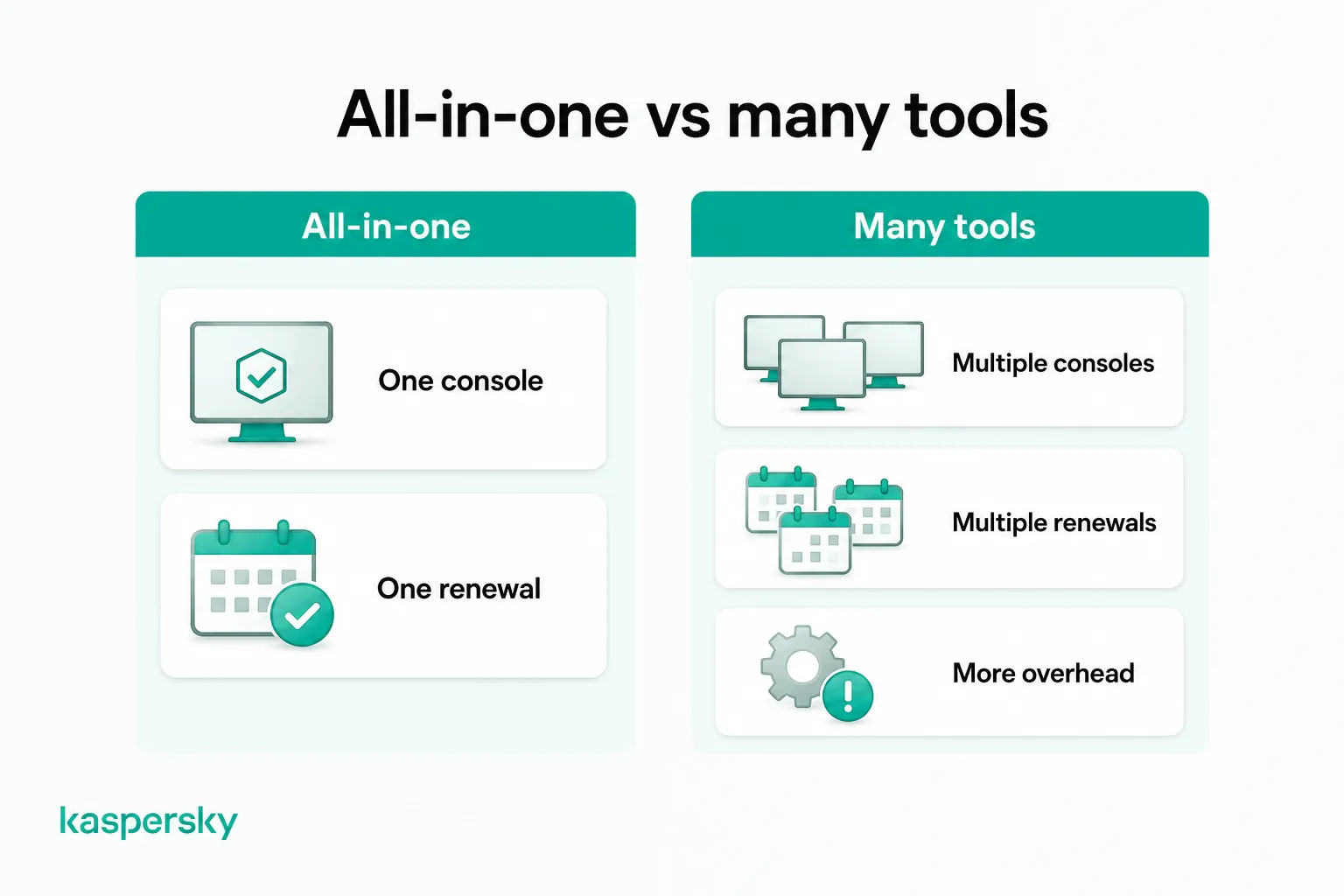
A single product, with one central console and renewal date, keeps the workload manageable, rather than juggling separate subscriptions for antivirus, passwords, VPN, and encryption.
What should you check before choosing?
Check that it protects every device your team uses, covers accounts and data as well as files, can be managed with the time you have, and does not need extra purchases to fill gaps.
Evaluate:
- Does it protect against malware, ransomware, phishing, and malicious websites?
- Does it run on every device and operating system your team uses, including Macs and phones?
- Does it help with account, employee, and data-related risks, not just files?
- How much setup and ongoing administration does the complete setup need?
- Can the business realistically manage it with the IT resources it already has?
- What additional security products or services would you still need to buy?
Related Articles
- How to Simplify IT Security for Businesses Without a Dedicated IT Team
- 15 Critical Cybersecurity Tips for Small Businesses
- Email Security for Small Businesses
Related Products:
FAQs
Can Microsoft Defender and another antivirus run at the same time?
Not as two active scanners. On a standard Windows PC, Defender Antivirus turns itself off when another antivirus is installed. On devices enrolled in Defender for Business, it switches to passive mode and continues to provide detection and response.
Do I need another antivirus if I use Microsoft Defender?
Not always. Microsoft Defender Antivirus detects malware well. Another product makes sense if you want accounts, passwords, and backups covered in one subscription, or find Defender for Business more time-intensive than your team can manage.
Is Microsoft Defender free for businesses?
Partly. Microsoft Defender Antivirus is included with Windows at no extra cost, on business devices as well as personal ones. Defender for Business is a paid subscription, available standalone or as part of Microsoft 365 Business Premium.
Do small businesses need EDR?
In the SE Labs test, Kaspersky Small Office Security blocked all 25 targeted attacks without relying on EDR. However, businesses that need investigation and response capabilities should consider EDR as part of their requirements.