Most small businesses already do some DIY security work, even if it isn’t anyone’s official job. Cybersecurity outsourcing means paying an outside company to take over some or all of that work, from installing updates to watching for suspicious logins. It isn’t the same as buying security software, which you can run yourself.
What is cybersecurity outsourcing?
A business that outsources cybersecurity pays an outside service provider to handle some or all of its security work. That can include monitoring alerts, managing devices and security technology, running vulnerability scans, and responding to incidents.
There are two types of providers that do most of this work:
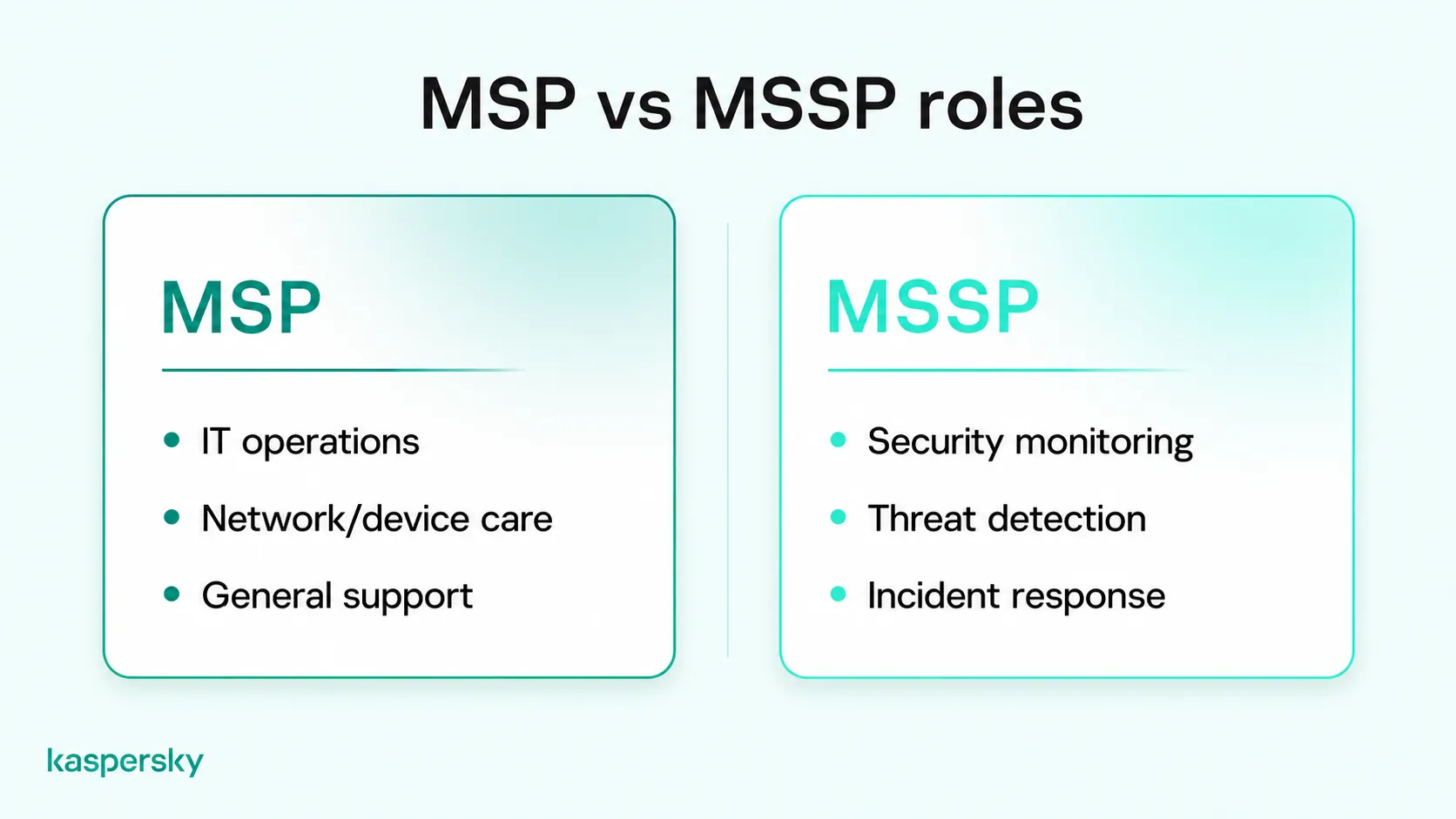
- A managed service provider (MSP) runs day-to-day IT, such as setting up computers, looking after the network, and fixing problems. An MSP is a common route for IT outsourcing for small business.
- A managed security service provider (MSSP) focuses on information security, with services that can include threat detection, monitoring outside office hours, and incident response.
Small businesses usually choose one of three setups:
- DIY, or in-house, security means your own staff handle everything, using security software and their own time.
- Outsourced security means a provider, usually an MSP or MSSP, does that work instead.
- A hybrid setup splits the work between DIY and outsourcing.
You don’t have to outsource all of your security. A business can outsource one task, like a yearly security check or help after an attack, and manage the rest in-house.
- Many small businesses can handle everyday protection themselves with security software, named owners for each task, and regular checks.
- Running your own security software doesn’t necessarily require hiring a managed service provider.
- An MSSP specializes in security, while an MSP mainly looks after day-to-day IT.
- Outsourcing can add expertise and monitoring, but your business keeps responsibility for access, staff training, and customer data.
- Prices for outsourcing usually depend on business size, device count, service scope, support needs, and how complex your IT setup is.
- With a hybrid setup, staff run routine security while outside specialists handle assessments or serious incidents.
Can small businesses manage cybersecurity themselves?
Many small businesses run their own computer security without a specialist on staff. It can work well for a simple setup, such as a few laptops, cloud email, and no on-site servers.
What does DIY cybersecurity require?
To run DIY cybersecurity, a small business usually needs someone with basic technical knowledge, regular time set aside for security work, a named owner for each task, and security software that covers every company device.
Small teams often skip the third point, and tasks without someone directly responsible for them fall through the cracks. Each task needs a named person covering who installs updates, who sets up new accounts, and who deals with alerts.
Many business security products let small teams manage protection through a centralized dashboard. This makes it easier to check device security, apply updates, and manage settings without handling every task individually.
Where does DIY cybersecurity fall short?
DIY cybersecurity can fall short on expertise and availability. A small team may not have the skills to spot a well-hidden attack or contain ransomware, and alerts that come in at night or on weekends may be missed.
The person in charge of security usually has another job as well. If they’re on leave when an alert comes in, it may not be picked up until a couple of days later. Also, if there is a serious incident, they may not have the necessary skills to find out what an attacker accessed, and what you need to tell customers or regulators.
What cybersecurity tasks can small businesses handle in-house?
Most small businesses can handle everyday device protection, account security, staff phishing training, and backups in-house. These tasks follow a set routine, and business security software automates much of it, from scheduled scans to pushing updates.
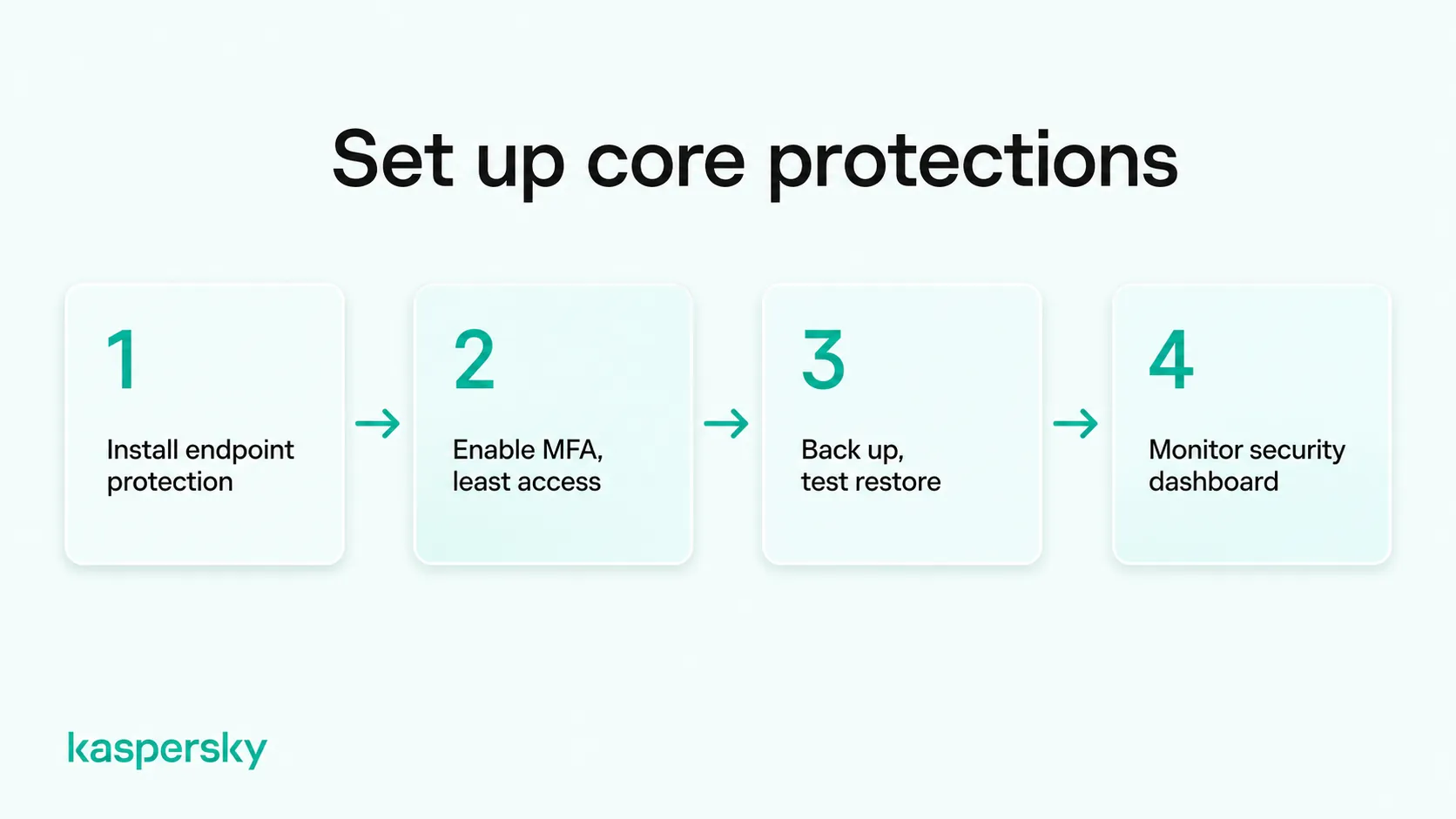
A small business can usually cover the basics with these four steps:
- Install security software (Small Office Security trial link) on every computer and phone. It can block known malware, flag risky downloads, and warn about phishing sites. Turn on automatic updates too. Many attacks use known vulnerabilities that a patch has already fixed. If staff use personal phones for work, decide which ones can access company data.
- Use multifactor authentication (MFA) for email, banking, and cloud apps. A stolen password is then less likely to be enough to get in. Give each person access only to what their role needs, and remove it on their last day. A short phishing refresher once or twice a year can help staff spot one of the most common threats they’ll face.
- Set up a backup routine and check that it works. Keep at least one copy offline or away from your main network, and test a restore every few months. Then write a one-page plan for a stolen laptop or a ransomware attack. It should say who to call, what to disconnect, and where the backups are.
- Monitor the central dashboard. Many business security solutions provide a dashboard for checking device protection, managing updates, and reviewing security alerts. Check routine reports, failed updates, and license expirations regularly, but make sure critical alerts are reviewed promptly rather than waiting for a scheduled weekly check.
Independently tested and awarded by the industry's leading labs.



What are the pros and cons of outsourcing cybersecurity?
An outside provider can bring specialist skills, extra security tools, less work for staff, and reassurance that professionals are handling security. The downside is dependence on the provider, less direct control, and possible gaps in what the contract covers.
An MSSP’s analysts deal with attacks across multiple organizations and may recognize threats that internal staff have not encountered before. Some providers also offer continuous security monitoring and incident response capabilities that would be difficult for a small business to maintain independently. Outsourced IT security can therefore reduce the need to hire dedicated cybersecurity specialists.
However, once a provider runs your security, you rely on its staff, its response times, and its decisions, and service quality can vary from provider to provider. You’ll also need to check the contracts to see what the provider covers. For example, a provider that looks after your laptops may not cover the cloud accounts that store your customer data.
Here’s how in-house IT vs. outsourcing compares:
|
Factor |
DIY (in-house) |
Outsourced |
|
Expertise |
Limited to what your staff know |
Access to security specialists, depending on the provider |
|
Flexibility |
Change tools or routines when you choose |
Changes may need the provider’s agreement or a contract update |
|
Administrative effort |
Staff time every week |
Less routine work, but time is needed to manage the provider |
|
Control |
Direct control over settings and access |
Shared control, depending on what the contract allows |
|
Availability |
Usually business hours |
Can include 24/7 monitoring, depending on the plan |
Outsourcing also requires internal coordination. Your business needs someone who can review the provider's work, approve important security decisions, and coordinate the response if an incident occurs.
How much does cybersecurity outsourcing cost compared to DIY?
DIY cybersecurity typically involves software subscriptions and staff time, while outsourcing adds provider fees but can reduce internal workload. Which approach costs less depends on your business size, number of devices, security requirements, and the services included..
Providers usually charge a monthly fee per device or per user, but two firms of the same size can still get different quotes. A plan that covers updates and antivirus usually costs less than one with 24/7 monitoring and incident response. Extra offices, remote staff, and on-site servers will also add cost, so a generic price list won’t show the real cost of cybersecurity for small business.
DIY saves the provider’s fee, but the hours staff spend on security cost the business too, because that time comes out of their other work.
|
Cost item |
DIY |
Outsourced |
|
Recurring fees |
Security software licenses |
Monthly MSP or MSSP fee, often per device or user |
|
Setup |
Staff time to install and configure |
Onboarding fee, plus staff time during handover |
|
Ongoing administration |
Staff hours for updates, alerts, and checks |
Staff time to review reports and manage the provider |
|
Incident response |
Specialist help bought when needed |
Included or billed separately, depending on the contract |
|
Occasional specialist work |
Assessments or audits bought as needed |
Sometimes included, sometimes extra |
To compare the two fairly, list what you need to protect first such as your devices, accounts, and data. Note which tasks your staff can manage, and get quotes for the rest of the tasks. Then add up a year of software, staff time, and provider fees for each option.
When should a small business outsource cybersecurity?
A provider makes sense when your setup needs more skills or hours than your team can give. Many businesses without an IT specialist choose to keep their IT security in-house.
Which situations call for outside expertise?
A business is more likely to need outside expertise when its IT setup is complex, when industry rules set specific security requirements, or when a serious incident, such as ransomware or a data breach, needs specialist help to contain.
A medical practice with patient records, or an online shop that takes card payments, may have to meet rules on security controls, logging, or testing. During an attack, an incident response specialist can help contain the damage, keep evidence, and work out what data was accessed or stolen. Many small teams don’t have those skills, so they may not be equipped to respond well when an attack happens.
How can you decide between DIY and outsourcing?
Compare what your team can handle with what your business needs: the skills and hours your setup demands, the rules your industry sets, and your budget. Keep what staff can cover in-house, and get quotes for the rest.
Ask yourself:
- Can someone on staff configure security software, read alerts, and spot when something looks wrong?
- Does that person have a few hours a week for security, protected from their other work?
- Do you run your own servers, several sites, or a large remote workforce?
- Do customers, insurers, or regulators expect specific controls or regular testing?
- Would a provider cost less than the staff time you’d otherwise spend?
If your team has the skills and time to manage everyday security, DIY may be sufficient. If you only need help with specific tasks, a hybrid approach can provide additional expertise without a full-service contract. Ongoing outsourcing may make more sense when security requirements consistently exceed your team's capabilities or availability.
Small-business examples
Bookkeeping firm
This four-person firm works from laptops, cloud email, and a shared online drive, with no servers to maintain. One partner spends an hour each Friday checking the security dashboard and confirming last week’s backup ran. With security software and MFA on every account, the firm may not need outside help at all.
Architecture practice
A 15-person practice runs its own file server, and several architects work from home and connect to it remotely. In this example, the office manager handles daily checks, but no one has checked whether staff connect to the server securely. A specialist could review the security set-up once a year to pick up gaps like this, without the practice signing a monthly contract.
Online retailer
The retailer has 40 staff, takes card payments, and runs several cloud systems. Its security software flags more alerts each day than its two-person IT team can review, and its online store has to stay up around the clock. Here, managed cybersecurity for small business may be the more practical choice, because it adds full-time monitoring and incident response.
Can small businesses combine DIY and outsourced cybersecurity?
Small businesses can combine the two in a hybrid setup, where staff handle routine tasks such as updates, accounts, and backups. Outside specialists cover the work the team lacks the skills or time for, such as monitoring or incident response.
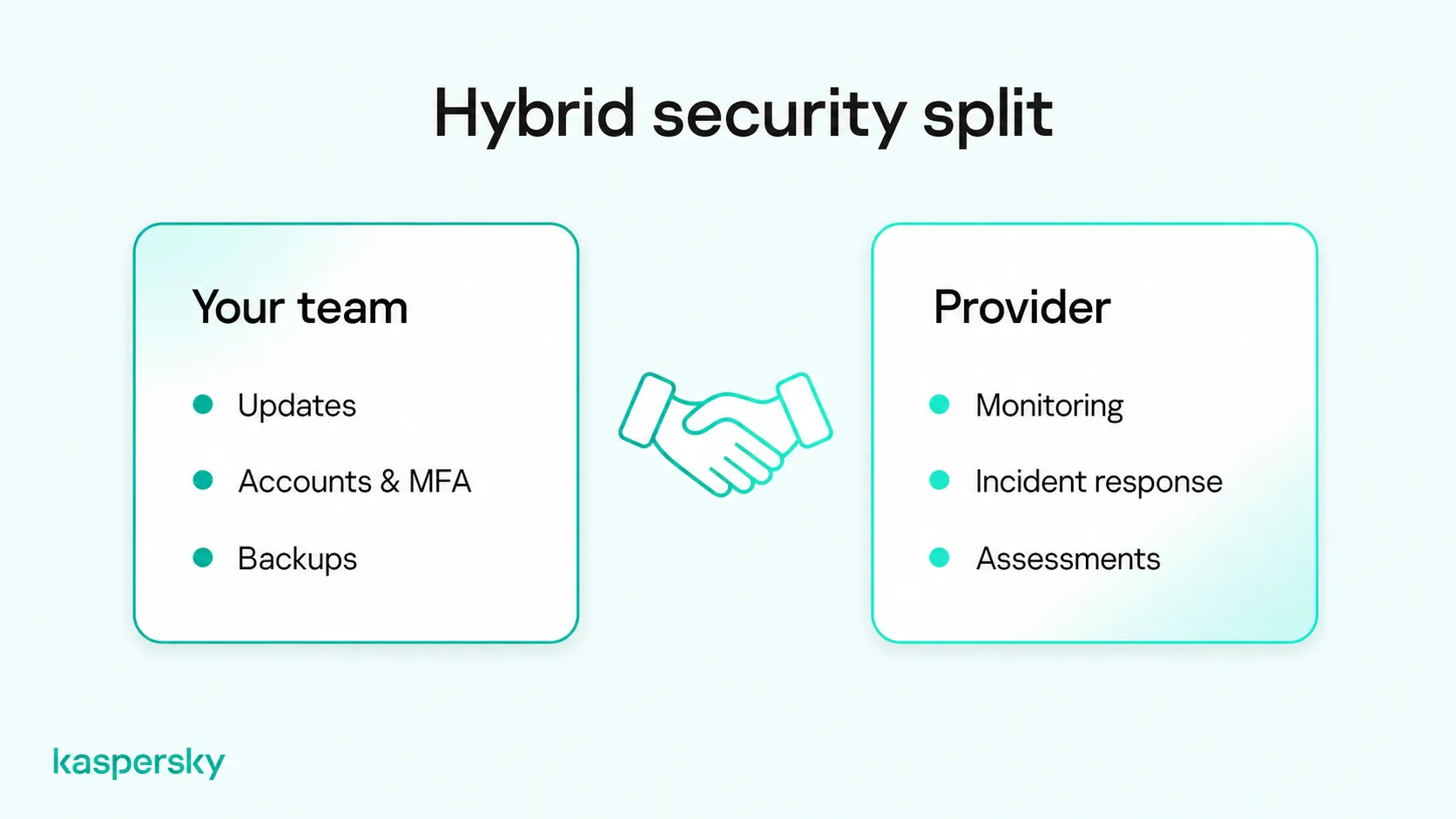
Agree on who does what before you sign a contract. The contract should list which devices and accounts the provider covers and which tasks stay with your staff. It should also say who contacts whom when an alert needs escalating, and the provider’s agreed response times.
If you already pay an MSP, use the same division of work to review your contract. List what you pay for, and mark the services you use. Check which tasks your staff could handle themselves, and look for gaps, such as staff phones or new devices the provider doesn’t cover. It also helps to ask how the provider reports on outsourced IT security management, so you can see what it does each month.
Related Articles:
- How to simplify IT security for businesses without an IT team
- A comprehensive guide to small business cybersecurity
- Email security for small businesses
- What are the key differences between EDR vs antivirus?
Related Products:
- Kaspersky Small Office Security
- Download Kaspersky Small Office Security Free trial
- Download a free 30-day trial of our Premium plan
FAQs
Can you start with DIY cybersecurity and switch to managed services later?
Yes. Many providers onboard businesses that already run their own security. An up-to-date list of devices, accounts, and security settings can speed up the handover, though some providers may want to replace your existing tools.
How can you tell if a managed security provider is doing its job?
Check its reports against the service levels in your contract, such as agreed response times. Good reports show alerts handled, updates applied, and incidents investigated. Slow responses, vague summaries, or devices missing from its records may point to gaps.
What cybersecurity responsibilities remain with your business after outsourcing?
Your business remains responsible for protecting customer data, managing employee access, training staff, and meeting applicable security requirements. Outsourcing technical tasks does not remove these responsibilities, although your provider may also have legal and contractual obligations.
Does a small business need a security operations center (SOC)?
Usually not one of its own. A SOC is a team that monitors and responds to security alerts around the clock. Few small businesses can staff one, so those that need 24/7 coverage may buy it through an MSSP.