VPN stands for "Virtual Private Network" and describes the opportunity to establish a protected network connection when using public networks. VPNs encrypt your internet traffic and disguise your online identity. This makes it more difficult for third parties to track your activities online and steal data. The encryption takes place in real time.
- A VPN hides your IP address by letting the network redirect it through a specially configured remote server run by a VPN host.
- VPNs hide your IP address and route traffic through a remote server, making it more difficult for websites, advertisers, and others to track your location or browsing habits.
- Using a VPN can improve privacy on public Wi-Fi networks and add an extra layer of security when accessing sensitive accounts or personal information.
- VPNs are commonly used for remote work, everyday browsing, streaming, online shopping, and protecting data while traveling.
- A VPN enhances privacy and security, but it does not make users completely anonymous or protect against every online threat, so good cybersecurity habits are still essential.
How does a VPN work, and why do you need one?
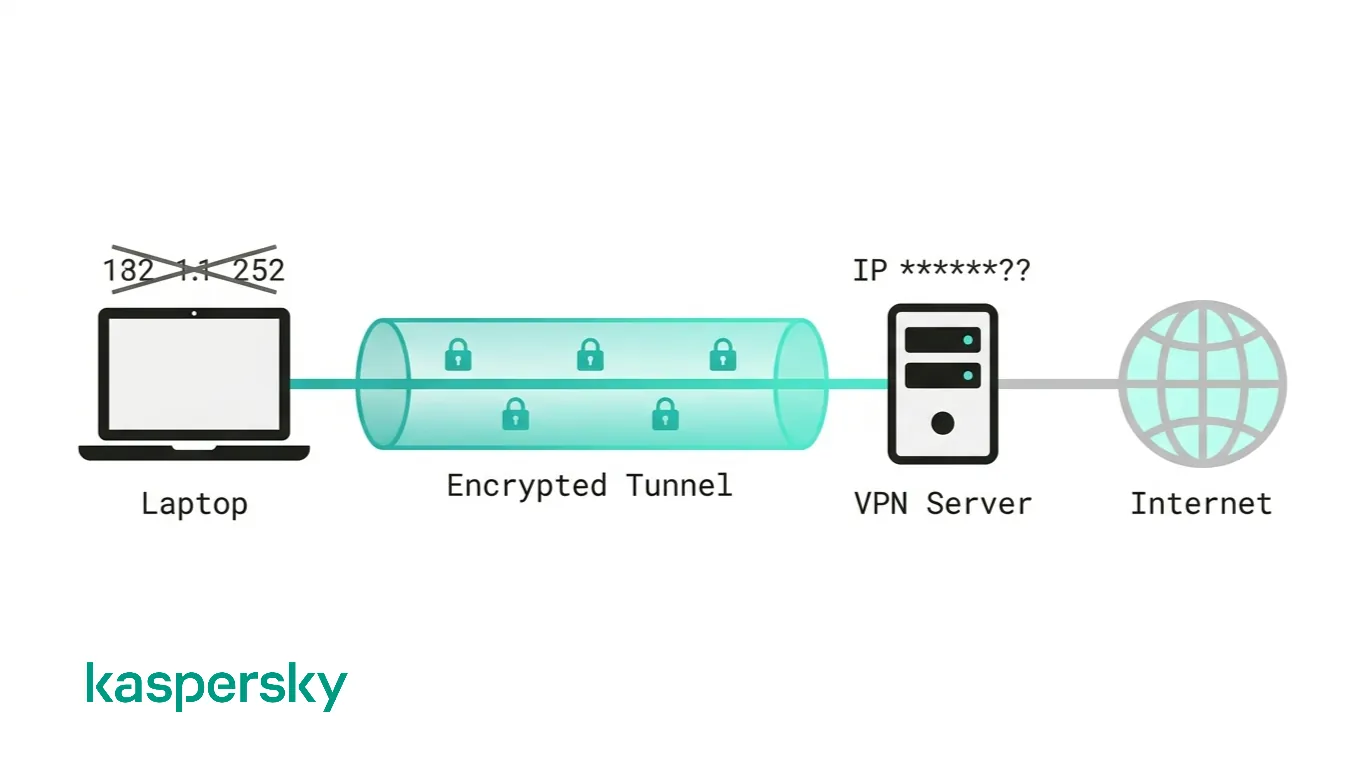
A VPN hides your IP address by routing your internet connection through a specially configured remote server operated by the VPN provider. Instead of websites and online services seeing your real IP address, they see the IP address of the VPN server.
The VPN simultaneously creates an encrypted tunnel between your device and the internet. This encryption scrambles your data so that anyone who intercepts it cannot easily read or use it. Your Internet Service Provider (ISP) and other third parties can see that you are connected to a VPN, but they cannot easily view the websites you visit or the data you send and receive.
VPNs protect from multiple threats online. That’s one of the reasons why almost half of web users surveyed by Forbes use a VPN in their day-to-day lives.
What are the benefits of a VPN connection?
A VPN connection disguises your data traffic online and helps protect it from external access. They ensure that information sent between your device and the internet is encrypted, making it significantly more difficult for hackers and cybercriminals to read.
A VPN adds an extra layer of security between your device and the internet and reduces the chance of data interception.
Secure encryption
When you connect to a VPN, your data traffic is encrypted before it travels across the internet. This means that even if someone intercepts the connection, the information is unreadable without the correct encryption key.
Most leading VPN providers use AES-256 encryption. This is a widely trusted security standard used to protect everything from online banking to government communications. It uses sophisticated cryptographics to help keep passwords and other personal information secure when using the internet.
Disguising your whereabouts
A VPN acts as a proxy server. It hides your device's IP address and replaces it with the IP address of the VPN server you connect to. This makes it much more difficult for websites and third parties to determine your real location or associate your browsing activity with your device.
Your internet service provider can still see that you are connected to a VPN, but the traffic is encrypted. This means it cannot easily see the websites you visit or the information being transmitted.
Most VPN services do not store logs of your activities. This keeps your activity and whereabouts even more private.
Access to regional content
Regional web content is not always accessible from everywhere. Services and websites often contain content that can only be accessed from certain parts of the world.
Standard connections use local servers in the country to determine your location. This means that you cannot access content at home while traveling, and you cannot access international content from home. With VPN location spoofing, you can switch to a server in another country and effectively “change” your location.
Secure data transfer
A VPN helps create a secure connection between your device and the network you are accessing. This reduces the risk of sensitive information being intercepted while in transit. This is especially useful if you work remotely or regularly send confidential information over the internet.
To gain access to the network, a VPN connection is often required. VPN services connect to private servers and use encryption methods to reduce the risk of data leakage.
Why should you use a VPN connection?
The biggest reason to use a VPN is often greater control over online privacy. Websites, advertisers, apps, and data brokers can all collect information about users and their online activity to build detailed user profiles. VPNs can reduce the risk off this.
A VPN can also provide peace of mind when using networks you don't control. Scenarios like working from a hotel or shopping from a café. A reliable VPN helps reduce the risk associated with using these shared internet connections.
VPNs have also become an everyday tool for workers accessing company resources and familiar online services from almost anywhere in the world. They are equally useful for anyone who wants to reduce unnecessary tracking and browse with greater confidence.
When would you use a VPN?
There are a range of cases where VPNs can improve security and privacy. These include:
- Public Wi-Fi: Protecting online activity when connected to shared networks in cafés, airports, hotels, and libraries.
- Everyday browsing: Reducing tracking by advertisers, websites, and other third parties.
- Traveling abroad: Accessing familiar websites and region-specific services while away from home.
- Remote work: Connecting securely to company systems or confidential files outside the office.
- Gaming: Helping avoid ISP bandwidth throttling and adding protection against some online attacks, such as DDoS attempts.
- Online shopping: Making purchases on public networks with greater confidence and potentially avoiding location-based pricing differences.
What should a good VPN do?
Not all VPN services offer the same level of privacy or security. A trustworthy provider should combine strong technical protections with transparent business practices. This can give users confidence that their data is handled responsibly.
- A clear no-logs policy: The provider should explain what information it collects
- Independent security audits: Regular third-party audits and transparency reports help verify that privacy claims match real-world practices.
- Reliable safety features: Modern VPN protocols help maintain a secure connection if network conditions change.
- Strong account protection: Support for multi-factor authentication and secure account recovery reduces the risk of unauthorized access.
- Cross-platform support: A good VPN should work consistently across computers and other devices.
- Transparent policies and support: Clear privacy documentation and a long-standing reputation for security are often just as important as technical specifications.
Protect your privacy with unlimited VPN
Kaspersky Premium offers various tools designed to protect your devices, including an unlimited VPN designed to provide reliable and fast virtual connections all over the world.
Try Premium for FreeProtect your privacy without compromise
Privacy is about more than encryption. As briefly mentioned, a trustworthy VPN provider should have a clear no-logs policy. This means it does not record your browsing activity or online traffic. Many leading providers also publish transparency reports or undergo independent security audits to demonstrate that their privacy claims match their real-world practices.
It is worth reviewing a VPN’s privacy policy and reputation to understand what information is collected and how it is handled.
What is split tunneling?
Split tunneling allows you to choose which apps or websites use the VPN connection and which connect directly to the internet. For example, you might route your work applications through the VPN while allowing streaming services or local devices to use your regular connection.
This can improve performance and reduce bandwidth usage while still protecting the traffic that matters most. However, any activity that bypasses the VPN will not benefit from its encryption or privacy protections.
What is a VPN kill switch?
A VPN kill switch is a safety feature that protects your privacy if the VPN connection unexpectedly drops. Instead of allowing your device to reconnect through your normal internet connection, it automatically blocks internet traffic until the VPN is restored.
This helps prevent your real IP address or online activity from being exposed during temporary connection interruptions. It is an important feature for anyone who relies on a VPN for privacy or security.
The history of VPNs
Since humans have been using the internet, there has been a movement to protect and encrypt internet browser data. The US Department of Defense already got involved in projects working on the encryption of internet communication data back in the 1960s.
The predecessors of the VPN
Their efforts led to the creation of ARPANET (Advanced Research Projects Agency Network), a packet switching network, which in turn led to the development of the Transfer Control Protocol/Internet Protocol (TCP/IP).
The TCP/IP had four levels: Link, internet, transport, and application. At the internet level, local networks and devices could be connected to the universal network – and this is where the risk of exposure became clear. In 1993, a team from Columbia University and AT&T Bell Labs finally succeeded in creating a kind of first version of the modern VPN, known as swIPe: Software IP encryption protocol.
In the following year, Wei Xu developed the IPSec network, an internet security protocol that authenticates and encrypts information packets shared online. In 1996, a Microsoft employee named Gurdeep Singh-Pall created a Peer-to-Peer Tunneling Protocol (PPTP).
Early VPNs
Contiguous to Singh-Pall developing PPTP, the internet was growing in popularity and the need for consumer-ready, sophisticated security systems emerged. At that time, anti-virus programs were already effective in preventing malware and spyware from infecting a computer system. However, people and companies also started demanding encryption software that could hide their browsing history on the internet.
The first VPNs therefore started in the early 2000s but were almost exclusively used by companies. However, after a flood of security breaches, especially in the early 2010s, the consumer market for VPNs started to pick up.
What types of VPNs are there?
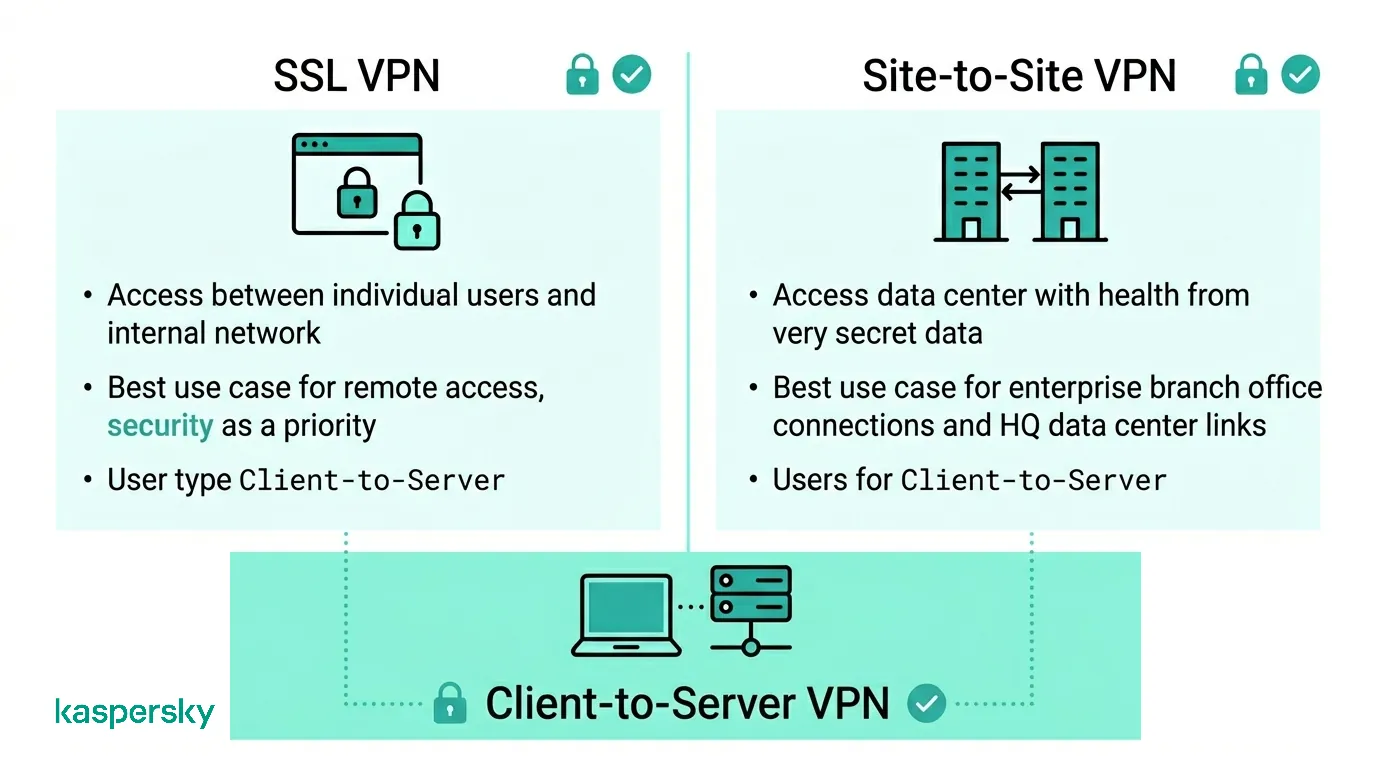
There are many different types of VPNs, but you should definitely be familiar with the three main types:
SSL VPN
Often, not all employees of a company have access to a company laptop they can use to work from home. During the coronavirus crisis in Spring 2020, many companies faced the problem of not having enough equipment for their employees. In such cases, the use of a private device (PC, laptop, tablet, mobile phone) is often resorted to. In this case, companies fall back on an SSL-VPN solution, which is usually implemented via a corresponding hardware box.
The prerequisite is usually an HTML-5-capable browser, which is used to call up the company's login page. HTML-5 capable browsers are available for virtually any operating system. Access is guarded with a username and password.
Site-to-site VPN
A site-to-site VPN is essentially a private network designed to hide private intranets and allow users of these secure networks to access each other's resources.
A site-to-site VPN is useful if you have multiple locations in your company, each with its own local area network (LAN) connected to the WAN (Wide Area Network). Site-to-site VPNs are also useful if you have two separate intranets between which you want to send files without users from one intranet explicitly accessing the other.
Site-to-site VPNs are mainly used in large companies. They are complex to implement and do not offer the same flexibility as SSL VPNs. However, they are the most effective way to ensure communication within and between large departments.
Client-to-Server VPN
Connecting via a VPN client can be imagined as if you were connecting your home PC to the company with an extension cable. Employees can dial into the company network from their home office via the secure connection and act as if they were sitting in the office. However, a VPN client must first be installed and configured on the computer.
This involves the user not being connected to the internet via his own ISP, but establishing a direct connection through his/her VPN provider. This essentially shortens the tunnel phase of the VPN journey. Instead of using the VPN to create an encryption tunnel to disguise the existing internet connection, the VPN can automatically encrypt the data before it is made available to the user.
This is an increasingly common form of VPN, which is particularly useful for providers of insecure public WLAN. It prevents third parties from accessing and compromising the network connection and encrypts data all the way to the provider. It also prevents ISPs from accessing data that, for whatever reason, remains unencrypted and bypasses any restrictions on the user's internet access (for instance, if the government of that country restricts internet access).
The advantage of this type of VPN access is greater efficiency and universal access to company resources. Provided an appropriate telephone system is available, the employee can, for example, connect to the system with a headset and act as if he/she were at their company workplace. For example, customers of the company cannot even tell whether the employee is at work in the company or in their home office.
How secure is a VPN?
A VPN is a valuable privacy and security tool, but it is not a guarantee of complete online protection. It reduces certain risks like exposing internet traffic on public Wi-Fi or revealing your IP address. A VPN cannot eliminate every cybersecurity threat.
Software like this cannot stop you from clicking a phishing link or installing compromised software. If malware or spyware is already on your device, it can still access your files or steal information regardless of whether a VPN is active.
It's also important to remember that a VPN does not make you anonymous online. Websites can still recognize logged-in accounts. Cookies or browser fingerprinting may continue to identify your device.
The strongest protection comes from combining a VPN with trusted antivirus software and strong digital habits. A VPN does not provide an insurance policy against all online threats.
Selecting a secure VPN provider
Choosing a VPN provider you can trust is just as important as choosing to use a VPN in the first place. Your ISP cannot easily see your encrypted internet traffic. Your VPN provider handles that traffic on your behalf. If the provider has weak security or poor privacy practices, your data could still be at risk.
Look for providers with a clear no-logs policy, strong encryption standards, transparent privacy policies, and independent security audits that verify their claims.
Free VPN services may be suitable for occasional use, but some rely on advertising or data collection to support their business model and may offer fewer security features or limited performance. Review a prospective VPN’s privacy practices and reputation to ensure it meets your security and privacy expectations.
What does a VPN not protect you from?
A VPN does not protect against every online threat. Its primary purpose is to encrypt your internet connection and hide your IP address.
A VPN cannot prevent you from downloading malicious files, entering passwords on fake websites, or sharing personal information with scammers. It also cannot stop malware that is already installed on your device from accessing your files or stealing data.
Does a VPN make you anonymous?
No. A VPN improves privacy by hiding your IP address and encrypting your internet traffic, but it does not make you completely anonymous online.
If you sign into a website using your personal account, that service still knows who you are regardless of whether you are using a VPN. Things like browser fingerprinting and information you voluntarily share can also be used to identify or profile you.
A VPN reduces the amount of information exposed to third parties. True anonymity depends on how you use the internet.
Can a VPN stop malware and phishing attacks?
No. A VPN encrypts internet traffic but does not inspect files or block every malicious file.
If you click a phishing link or download malware, a VPN alone will not prevent the attack. That is why cybersecurity experts recommend combining a VPN with antivirus software and sensible behaviors.
Can you be tracked with a VPN?
It is possible to be tracked while using a VPN. It depends on who is doing the tracking and what methods they use. A VPN hides your real IP address and encrypts your internet traffic. This can make many common forms of tracking more difficult. It does not make you invisible online.
Cookies and other technologies can still collect information about your activity even when a VPN is enabled.
Can websites track you with a VPN?
Yes. While a VPN hides your IP address, websites can still recognize you through cookies and browser fingerprinting. They can also track you if you are logged in.
If you sign into a social media platform or online store, that service can associate your activity with your account regardless of which VPN server you use. Clearing or limiting cookies and using privacy-focused browsers can reduce this type of tracking.
Can your ISP track you with a VPN?
Your ISP can see that you are connected to a VPN server and how much data is being transmitted, but it cannot easily view the contents of your encrypted traffic or the specific websites you visit through the VPN.
The ISP simply sees an encrypted connection between your device and the VPN provider.
Can law enforcement track VPN users?
VPNs are privacy tools. They are not anonymity tools or legal shields. Reputable VPNs encrypt internet traffic and may operate no-logs policies, but they must still comply with the laws of the countries in which they operate.
Law enforcement agencies may investigate online activity using a range of legal and technical methods that extend beyond IP addresses alone. A VPN should be used to improve privacy and security.
Here’s how to surf securely with a VPN
A VPN encrypts your internet traffic so that it can only be decoded with the correct encryption key. Only your device and the VPN server have access to this key. This means your ISP and other third parties cannot easily see the contents of your online activity.
They generally work in three simple steps:
- Connect to the VPN. Once you go online, start your VPN. It creates a secure, encrypted tunnel between your device and the internet.
- Route traffic through the VPN server. Your device joins the VPN's network and your IP address is replaced with one provided by the VPN server. It helps to conceal your real location.
- Browse more securely. With the encrypted connection active, you can browse or work online with an additional layer of privacy and protection for your personal data.
How do you install a VPN on your computer?
Before installing a VPN, it helps to understand the different ways it can be implemented. The right option depends on devices and your own circumstances.
VPN client
Software must be installed for standalone VPN clients. This software is configured to meet the requirements of the endpoint. When setting up the VPN, the endpoint executes the VPN link and connects to the other endpoint, creating the encryption tunnel. In companies, this step usually requires the entry of a password issued by the company or the installation of an appropriate certificate. By using a password or certificate, the firewall can recognize that this is an authorized connection. The employee then identifies him/herself by means of credentials known to him/her.
Browser extensions
VPN extensions can be added to most web browsers including Google Chrome and Microsoft Edge. Some browsers even include built-in VPN functionality.
Browser extensions are quick to install and convenient for securing web browsing, but they only protect traffic generated within that browser. Other applications, such as email clients, video calls, online games, or cloud backup services, continue to use your normal internet connection.
While browser extensions are not quite as comprehensive as VPN clients, they may be an appropriate option for occasional internet users who want an extra layer of internet security.
Always choose a reputable option as data harvesters may attempt to use fake VPN extensions to steal your data.
Router VPN
If multiple devices are connected to the same internet connection, it may be easier to implement the VPN directly on the router than to install a separate VPN on each device. A router VPN is especially useful if you want to protect devices with an internet connection that are not easy to configure, such as smart TVs. They can even help you access geographically restricted content through your home entertainment systems.
Many router VPNs are straightforward to install. They can provide extra security and privacy, and prevent your network from being compromised when insecure devices log on. A router VPN provides continuous protection but may require more advanced setup depending on the router model.
Company VPN
A company VPN is a custom solution managed by an organization's IT team. It allows employees to securely access internal systems, applications, and files while working remotely or traveling.
The VPN is administered by the company and users usually have limited control over its settings. Activity and connections may be logged according to the organization's security policies, helping businesses protect sensitive data and reduce the risk of unauthorized access.
Can you also use a VPN on your smartphone or other devices?
Yes, there are a number of VPN options for smartphones and other internet-connected devices. A VPN can be essential for your mobile device if you use it to store payment information or other personal data or even just to surf the internet. Many VPN providers also offer mobile solutions - many of which can be downloaded directly from the Kaspersky VPN Free Trial page.
How to configure a VPN on iPhone or other smartphone
iPhone VPN services and Android VPNs are easy to use and generally include the following:
- The installation process usually only downloads one app from the iOS App Store or the Kaspersky VPN download page. Although free VPN providers exist, it’s wise to choose a professional provider when it comes to security.
- The setup is extremely user-friendly, as the default settings are already mostly designed for the average smartphone user. Simply log in with your account. Most apps will then guide you through the key functions of the VPN services.
- Switching on the VPN literally works like a light switch for many VPN apps. You will probably find the option directly on the home screen.
- Server switching is usually done manually if you want to fake your location. Simply select the desired country from the offer.
- Advanced setup is available for users requiring a higher degree of data protection. Depending on your VPN, you can also select other protocols for your encryption method. Diagnostics and other functions may also be available in your app. Before you subscribe, learn about these features to find the right VPN for your needs.
- To surf the internet safely from now on, all you have to do is first activate the VPN connection through the app.
Conclusion
A VPN is a simple and effective way to improve online privacy and ensure secure internet connections while browsing or working. It is particularly valuable on public Wi-Fi networks and whenever sensitive information is being transmitted. Many web users consider VPN use to be essential.
A VPN works best as part of a broader cybersecurity strategy. It should be combined with trusted security software and good online habits to provide an extra layer of protection that helps make everyday internet use safer and more private.
Related Articles:
- How does VPN keep me safe online while browsing?
- What are the differences between Proxies & VPN?
- How does private browsing compare to using a VPN?
- Why is a Smartphone VPN essential for your online security?
Related Products:
- Kaspersky Premium
- Download a free 30-day trial of our premium plan
- Kaspersky VPN Secure Connection
- Download Free 7-Day VPN Trial
FAQs
How does a VPN work?
A VPN creates an encrypted connection between your device and a remote server. Your internet traffic passes through this secure tunnel. It hides your IP address and makes it more difficult for third parties to monitor your online activity.
Are VPNs legal?
VPNs are legal in many countries and are widely used by individuals and businesses to improve online privacy and security. Some countries do restrict or regulate VPN use, so it is important to check the local laws where you live or travel.
What are the benefits of a VPN?
A VPN encrypts your internet connection, hides your IP address, and helps protect personal data on public and private networks. It can also improve online privacy and provide access to region-specific websites and services.