
AI agents are moving fast from impressive demos to real tools that can act on your behalf, and OpenClaw is one of the names driving the latest wave of attention. You may have heard the same software referred to as Clawdbot and Moltbot, names used at different stages of development by its creator, Austrian developer Peter Steinberger.
Promoted as a hands-off personal assistant that can operate software for you, it also raises important questions about access and security.
- AI agents are action-capable AI systems, not just conversational tools.
- Tools like OpenClaw show how powerful self-hosted AI agents can be.
- This power introduces new security risks when agents process untrusted input.
- Prompt injection is a key threat for AI agents, even more than for chatbots.
- Persistent memory can amplify mistakes and prolong attacks.
- AI agents are powerful, but not a safe default for most consumers.
What is the hype about OpenClaw?
OpenClaw is getting attention because it represents a shift from AI that answers questions to AI that can actively carry out tasks on a real system and even use software. The potential security issues have also meant more people are talking about OpenClaw in security circles. What makes OpenClaw appealing to developers and power users?
OpenClaw stands out because it can take real actions, not just generate text or suggestions. Instead of telling you what to do, it can do things itself. The technology can open apps, send messages, move files, run commands, and interact with systems directly on your behalf.
That level of automation is what’s drawing interest. Developers and power users see system-level control as a way to reduce repetitive work or automate workflows. The idea of an AI agent that can “do the job” rather than assist from the sidelines is a strong concept.
This promise of hands-on capability is why OpenClaw has moved quickly from a niche project into wider discussion.
Why this matters beyond OpenClaw
OpenClaw provides a visible example of a broader shift toward AI agents that actually act, not just respond and give advice.
Questions about potential misuse become unavoidable when this sort of tech grows. What OpenClaw shows is where AI is heading. That makes it relevant far beyond one project and sets the stage for ongoing discussions about how these agents should be controlled. Can they be trusted?
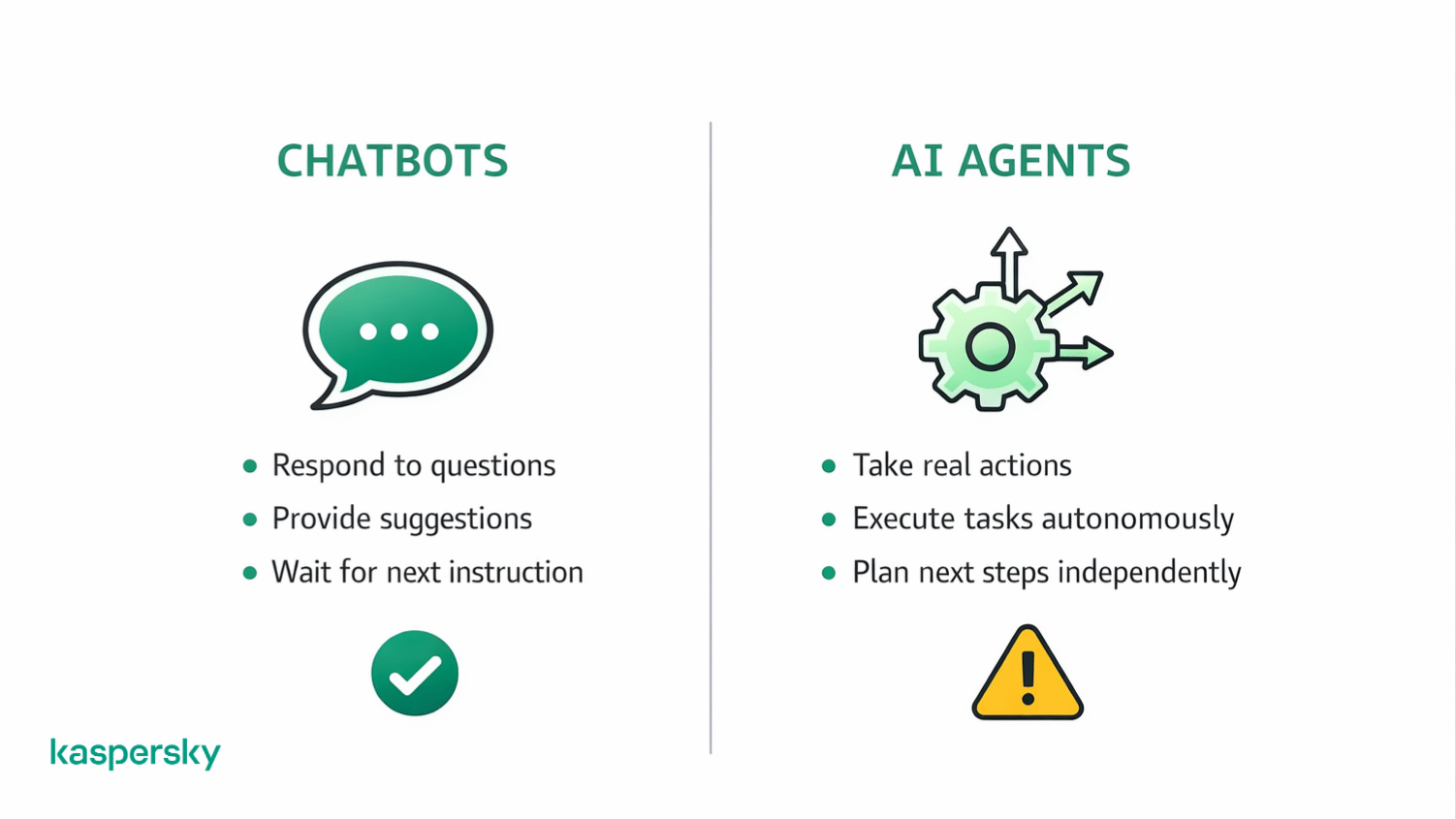
What are AI agents, and what makes them different from other AI tools?
AI agents are systems that don’t just provide text or audio answers to your questions. They can actively plan steps and carry out actions to achieve a goal. Instead of stopping at advice, they decide what to do next and execute it.
An AI agent can observe a situation and take action. This is different from most AI tools, which respond to prompts but wait for the next instruction. Early examples include task-running agents like Manus (now owned by Meta). Manus shows how agents can move beyond chat into action. It can provide data analysis or even actively write code to solve problems without having to be explicitly asked what to do. There’s less human input.
OpenClaw builds on this same idea of action-capable AI, but applies it in a more direct and powerful way.
Is OpenClaw a typical AI agent or something more advanced?
OpenClaw fits within the AI agent category. It offers a more powerful implementation than many of the tools most people are now familiar with.
This AI tool can plan tasks and act without constant input. OpenClaw can interact directly with software and the operating system, not just APIs or limited tools. That broader access increases usefulness and sets it apart. It also raises the stakes and the importance of security.
Why self-hosted AI agents are different
Self-hosted AI agents run locally on your own system rather than on a remote service. This gives users more control over things like configuration and behavior. This also shifts responsibility.
When an agent has local access, security depends on how it’s set up, what permissions it has, and how it’s monitored. More control comes with more risk.
Recent projects show how the idea of “self-hosted” AI agents is starting to change. For example, Moltbot (formerly Clawdbot) can now be run using Cloudflare’s open-source Moltworker. This totally removes the need for dedicated local hardware by running the agent on a managed platform instead.
This lowers the barrier to entry and simplifies setup, but it also shifts where control lives. When an agent runs on cloud infrastructure, security depends not just on the agent itself, but on things like access controls and how data and permissions are handled across the platform.
For example, a user may connect an AI agent to their email, expecting it to read messages only, while the cloud setup also allows it to send emails unless that permission is explicitly turned off.
How do AI agents differ from chatbots like ChatGPT?
Chatbots like ChatGPT respond while AI agents act.
A chatbot can give you suggestions or explanations. An AI agent can actively open programs or go through workflows.
As an example, some people have used OpenClaw to automate trading. They’ve come up with rules and asked AI not just to give advice (ChatGPT could do this) but to actually execute trades.
Why do AI agents introduce new security risks?
As discussed previously, AI agents take actions rather than just giving advice. This often comes with access to files, applications, password management, or system functions.
The system access and autonomy given to OpenClaw changes both impact and risk. OpenClaw will request permission to interact with software or to take actions like sending an email or filling in forms without your oversight. This turns it into a wildcard.
Mistakes or manipulation can have real consequences. The risk is not only what the agent is told to do, but what it interprets as instructions while carrying out a task.
Why untrusted input is a core problem
AI agents consume large amounts of external content (like web pages and documents) to decide what to do next. That content is not always trustworthy.
Instructions don’t have to be direct. They can be hidden in text or data the agent reads while performing a task. This makes it possible for attackers to influence an agent’s behavior without ever interacting with it directly.
This problem creates a clear path to prompt injection. This is where untrusted input is used to steer an agent into taking actions it was never meant to perform.
Powerful AI tools require stronger protection
AI agents can access files, emails, and system functions. Kaspersky Premium helps detect suspicious activity, block malicious scripts, and protect your devices from real-world cyber threats.
Try Premium for FreeWhat is prompt injection in AI agents?
Prompt injection is a way of manipulating an AI agent by feeding it untrusted content that alters how it behaves.
The risk isn’t a technical flaw in code. It’s that the agent may treat external input like instant messages or comments as instructions. When that happens, the agent can be guided into taking actions it was never intended to perform.
How prompt injection works in real-world scenarios
Prompt injection can be direct or indirect.
- Direct – an attacker deliberately includes instructions in content the agent reads.
- Indirect – the agent picks up hidden or unexpected instructions from a website or message it processes during normal tasks.
The key issue is behavior. The agent may follow what it interprets as guidance, even if that guidance came from untrusted sources. No software bug is required for this to happen.
Why prompt injection is more dangerous for AI agents than chatbots
Injected instructions usually affect responses and advice given by chatbots. With AI agents, they can affect actions.
If an agent has access to files or system controls, manipulated instructions can lead to real-world changes. This is why prompt injection poses a greater risk for agents. The same technique that alters text output in a chatbot can trigger unintended actions when an agent is involved.
What is persistent memory in AI agents?
Persistent memory allows an AI agent to retain information over time. It means that it can use past input to guide future decisions instead of starting fresh with every task.
What persistent memory means for AI agents
An AI agent can store context and instructions across sessions as well as develop preferred ‘behaviors’. This helps the agent work more efficiently by remembering what it has learned or done before.
It also means that earlier input can influence later behavior. Instructions or assumptions picked up in a prior task may still shape how the agent acts in a different situation, even if the user is no longer aware of them.
Why persistent memory increases security risks
Persistent memory can introduce delayed effects. A harmful instruction may not cause immediate problems but can resurface later when conditions align.
This makes cleanup harder. The stored behavior may repeat across tasks. Fully restoring an agent will often require clearing memory or rebuilding configurations to ensure unwanted influence is removed.
What happens when an AI agent is misconfigured or exposed?
An AI agent can be accessed or influenced in ways the owner never intended, turning a helpful tool into a potential security risk.
This can happen through an accident or misunderstanding. It can also happen if third-parties try to manipulate the agent.
How AI agents can become exposed unintentionally
Exposure often happens through simple mistakes. Something as simple as weak authentication or overly broad permissions can make an agent reachable from outside its intended environment.
Running an agent locally does not automatically make it secure. If it connects to the internet or interacts with other systems then it can be influenced. Local control reduces some of the risks.
Why exposed AI agents become attack surfaces
Once exposed, an AI agent becomes something attackers can probe, test, and manipulate. They may try to feed it crafted input, trigger actions, or learn how it behaves over time.
Because agents can take real actions, abuse doesn’t have to look like a traditional hack. Misuse can involve steering behavior, extracting data, or causing unintended system changes, all without exploiting a classic software flaw.
What is the “lethal trifecta” in AI agent security?
The “lethal trifecta” describes three conditions that together create serious security risk for AI agents.
The three conditions that enable serious attacks
- The first condition is access to sensitive data, such as files, credentials, or internal information.
- The second is untrusted input, meaning the agent consumes content it cannot fully verify.
- The third is the ability to take external actions, like sending requests, modifying systems, or executing commands.
Individually, these factors can be manageable. They are dangerous when they form this trifecta. An agent that reads untrusted input and can act on it creates a clear path for manipulation. Controlling what actions an agent is allowed to perform is vital.
Should everyday users run AI agents today?
For most people, AI agents are still experimental tools. They can be useful in the right setup. The downside? They also introduce new risks that aren’t always obvious.
When using an AI agent can make sense
An AI agent can make sense in controlled and low-risk scenarios. This includes experimenting on a separate device. Some people try running agents that only handle non-sensitive tasks like organizing files or testing workflows.
Let’s say you want to use the agent to create an itinerary for your upcoming trip. It can access the information to do this and be prevented from being able to contact people directly or do anything too damaging.
If you’re comfortable managing settings and the mistakes made won’t be ‘high stakes’ then an agent can be a learning tool. The key is keeping scope small and access tightly limited.
When AI agents are a bad idea
AI agents are a poor fit when they have access to sensitive data or important accounts. Running agents without understanding permissions or the dangers of external inputs increases risk quickly.
It’s also okay to opt out. Choosing not to run an AI agent today is a reasonable decision if convenience comes at the cost of security or peace of mind.
What basic safeguards are essential when using AI agents?
Basic safeguards help reduce risk and keep mistakes from becoming serious problems.
Kaspersky’s software can add an extra layer of protection by flagging suspicious behavior and helping protect accounts from breaches. Our plans block everything from malware and viruses, to ransomware and spy apps.
What safety measures matter most
Isolation is key. Run agents on separate devices and accounts whenever possible so they can’t affect important data or systems. Limit permissions to only what the agent truly needs. We recommend that you avoid giving full system or account access by default.
Approval steps also matter. Requiring confirmation before sensitive actions adds a pause that can prevent unintended behavior like committing to spend money on your behalf. These simple controls have a high impact without adding much complexity.
What do AI agents mean for the future of consumer AI?
AI agents point toward a future where AI tools do more than assist. They take action. But that shift comes with trade-offs that consumers are only beginning to navigate.
What this moment tells us about AI agent maturity
AI agents are powerful but immature. They can automate tasks, but they still struggle with some elements of judgment and security. This doesn’t mean agents won’t become safer or more reliable. It means expectations should stay realistic.
AI agents show where things are heading, but widespread, everyday use will require better safeguards and tools designed with safety in mind from the start.
Related Articles:
- How does ChatGPT address cybersecurity concerns and potential risks?
- What are the risks of AI cybercrime in today's digital landscape?
- How do AI and Machine Learning enhance cybersecurity measures?
- What are the dangers of Deepfake technology today?
Related Products:
FAQs
Is OpenClaw free to download?
OpenClaw can be downloaded freely on Github. It is Open Source software. This means more room for people to modify and redistribute the software.
Is OpenClaw easy to set up?
There are tutorials that can get people running bots quickly, but a sophisticated setup requires time and specialist knowledge. It is all the more reason that running software that may not have been properly set up is risky.