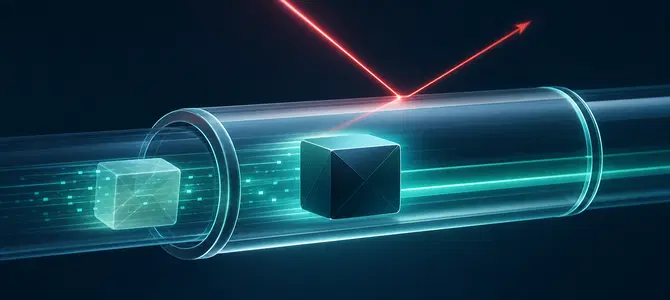
If you open the settings in a VPN app, you'll often find a list of protocols. IPsec is one of the options you may see, sometimes written as IKEv2/IPsec. It's also built into Windows, macOS, and iOS, so you may be using it without having chosen it.
The IETF standardized it in the 1990s as a general way to protect IP traffic across untrusted networks, from a permanent link between two office networks to a single user connecting from somewhere else. A consumer IPsec VPN applies that same protection to your own connection: it links your device to a server run by your VPN provider, so your traffic goes out through that server rather than from your device directly.
What is IPsec?
IPsec (Internet Protocol Security) is a set of protocols that protects data as it travels across IP networks. It encrypts each packet of your traffic, verifies where the packet came from, and checks that nothing was changed on the way.
Your data does not cross the internet as one piece. It is broken into packets, each one wrapped in addressing information so routers know where to send it. IPsec works on those packets individually.
The framework provides:
- Encryption: the contents of each packet become ciphertext, which a network operator or anyone listening in cannot read.
- Integrity checks: the receiving side confirms the data arrived unchanged.
- Authentication: each endpoint proves it is the machine it claims to be, using either a pre-shared key (a secret password both sides already hold) or a digital certificate (a credential issued and signed by a trusted authority).
- Anti-replay protection: packets an attacker captured earlier and sent again are rejected.
A VPN built on these protocols is an IPsec VPN. VPN software and network hardware use IPsec to create protected connections across public networks. Because IPsec works at the network layer, it can protect IP traffic across the device rather than being limited to a single application.
- IPsec is a set of protocols that encrypts and authenticates traffic at the network layer of IP connections.
- An IPsec VPN builds an encrypted tunnel between two endpoints, so anyone who intercepts the traffic sees scrambled data.
- ESP handles the encryption in current setups, while IKEv2 negotiates the keys before any data moves.
- Tunnel mode wraps the whole original packet and is the mode used by most VPN connections.
- Outdated algorithms and legacy settings can weaken IPsec, even though the standard itself remains current.
- Consumer VPN apps usually handle the encryption setup for you.
Helpful IPsec terms and definitions
IPsec terminology can get complicated quickly. Here's a quick reference for the terms you'll come across most often and what they mean:
|
Term |
What it means |
|
Cipher |
The mathematical method used to encrypt data, such as AES |
|
Ciphertext |
Data after encryption, unreadable without the key |
|
Diffie-Hellman |
A method that lets two endpoints agree on a shared secret key without ever sending it across the network |
|
Encapsulation |
Placing one packet inside another, so the original is hidden from view |
|
Endpoint |
Either of the two systems at the ends of a connection |
|
Gateway |
A router or firewall that handles traffic on behalf of a whole network |
|
IP header |
The addressing wrapper, showing where a packet came from and where it is going |
|
NAT |
Network Address Translation, how a home router shares one public address among your devices |
|
Network layer |
The level that moves packets between addresses, below individual applications |
|
Packet |
A small chunk of your data, wrapped with addressing information for its journey |
|
Payload |
The contents of a packet, as opposed to the addressing wrapper |
|
Pre-shared key |
A secret password configured on both ends in advance, used to prove identity |
|
Security association |
The record of settings and keys both ends agree on for a given tunnel |
|
VPN client |
The app on your device that sets up and manages the connection |
How does an IPsec VPN work?
An IPsec VPN sets up a protected tunnel in four quick stages: the two endpoints authenticate each other, agree on encryption terms, then encrypt and encapsulate every outgoing packet. The receiving end checks it for tampering and decrypts it.
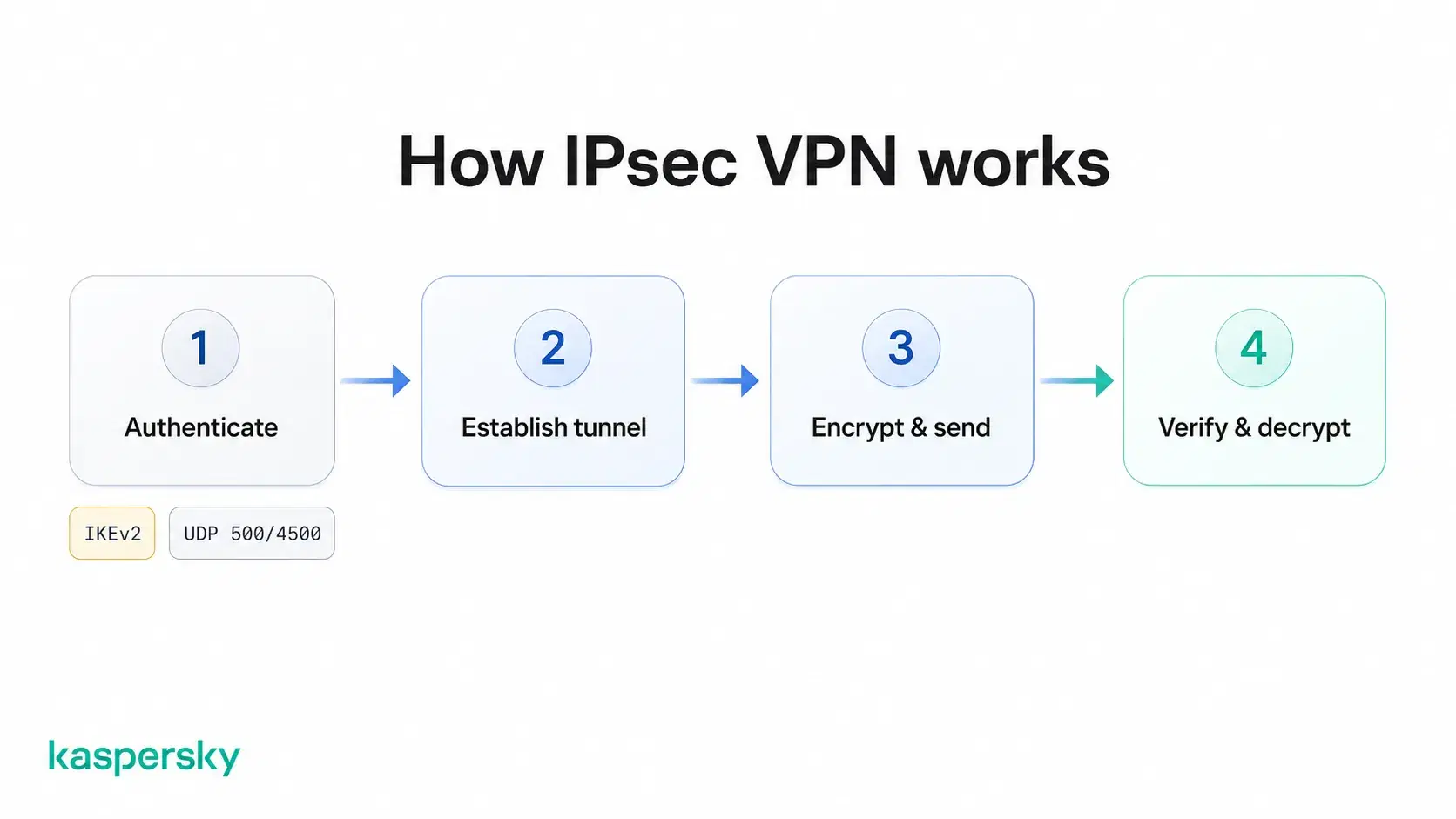
- Authentication and negotiation: the endpoints prove their identity to each other, then settle on the encryption and integrity algorithms they will use and the keys that go with them.
- Tunnel establishment: with the terms agreed, both sides open the protected connection and record the agreed settings as a security association, the shared rulebook for that tunnel.
- Encryption and transmission: outbound packets are encrypted and encapsulated before they leave your device, then cross the internet like any other traffic.
- Decryption at the destination: the receiving endpoint checks the packet for tampering, decrypts it, and passes the original data on.
Internet Key Exchange (IKE) runs the first two stages, and IKEv2 is the version in common use today. That negotiation normally runs over UDP port 500. If your device sits behind a router performing NAT, both sides switch to NAT Traversal (NAT-T), which wraps the key exchange and the encrypted traffic that follows in UDP 4500 so they cross the router unaltered.
What is IPsec used for?
IPsec secures traffic that has to travel over the public internet. The most common uses are remote workers connecting to an office network through a business VPN, permanent links between company sites, and VPN apps that offer IKEv2/IPsec for protecting browsing on public Wi-Fi.
Site-to-site vs. remote-access IPsec VPNs
A site-to-site IPsec VPN links whole networks together. A company with a head office and a warehouse across town puts a gateway at each end, and the tunnel runs between those two points. A printer in the warehouse can reach a server at head office without any VPN software on the printer itself because the gateway handles encryption for everything behind it.
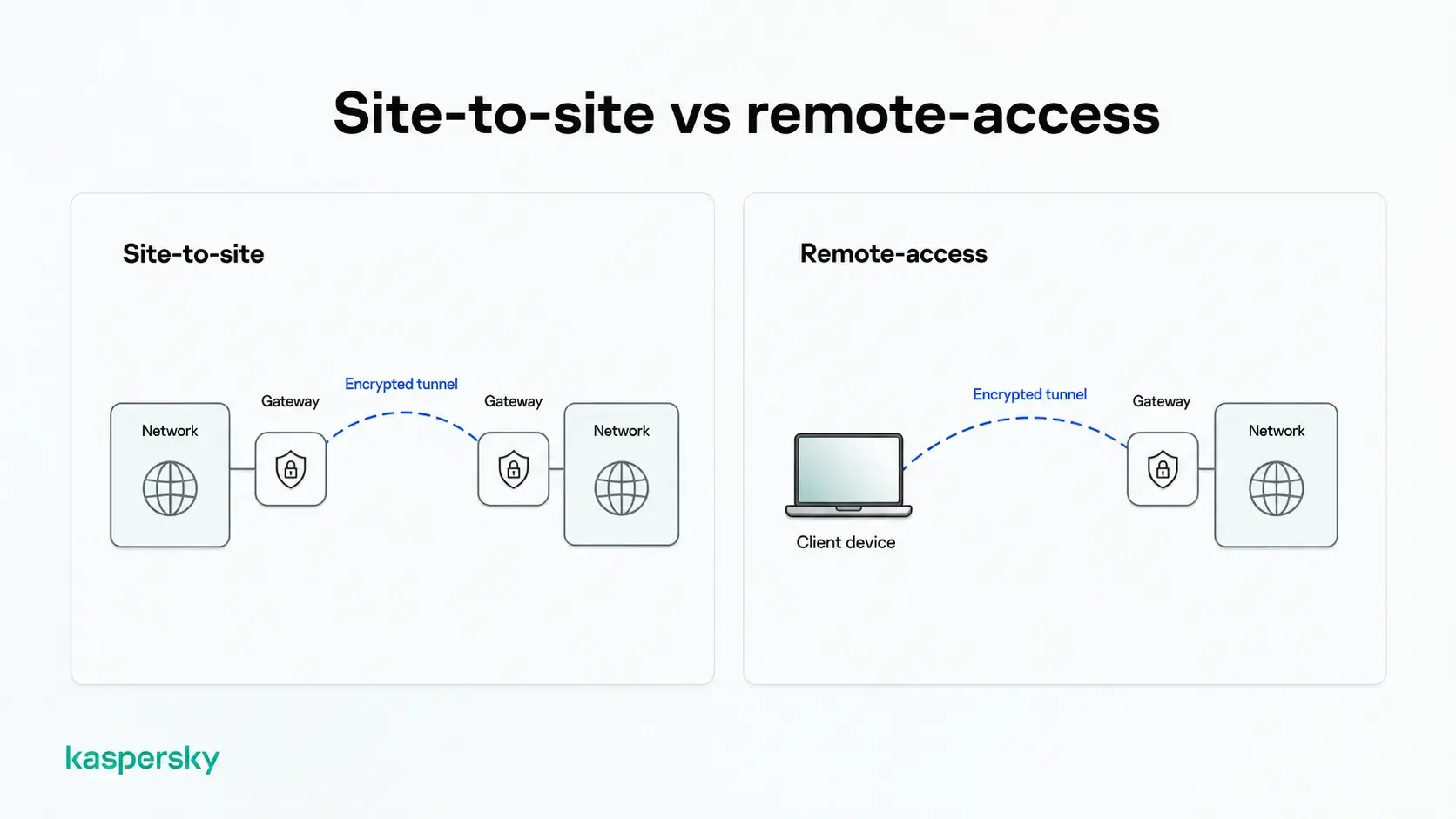
A remote-access IPsec VPN connects a single device to a whole network. Client software on your laptop forms one end of the tunnel, and the gateway on your office network forms the other, so that same server is reachable from a hotel room whenever the tunnel is up.
Which protocols does IPsec use?
IPsec is a suite of protocols:
- ESP (Encapsulating Security Payload): encrypts and authenticates the payload.
- AH (Authentication Header): checks integrity across the payload and most of the IP header, without encrypting anything.
- IKE (Internet Key Exchange): negotiates settings and establishes keys.
You may notice "IKEv2/IPsec" in VPN settings, and it looks like a choice between two protocols. It isn't: IKEv2 sets up the connection and IPsec protects what goes through it.
Why you'll only see ESP
ESP is what protects traffic in a current IPsec VPN. AH leaves your data readable to anyone who captures it, offering only proof that a packet came from the expected source and arrived unmodified.
AH also breaks when Network Address Translation sits in the path, because it protects parts of the IP header that NAT rewrites. Home routers and mobile networks use NAT, so AH is rarely used.
What is the difference between IPsec tunnel mode and transport mode?
Tunnel mode wraps the entire original packet, headers included, inside a new one. Transport mode encrypts only the payload and leaves the original IP header visible, which is suited to direct server-to-server traffic inside a data center.
The word tunnel does double duty here, which trips people up. An IPsec tunnel is the protected connection between two endpoints whereas tunnel mode is a separate decision about how much of each packet gets wrapped.
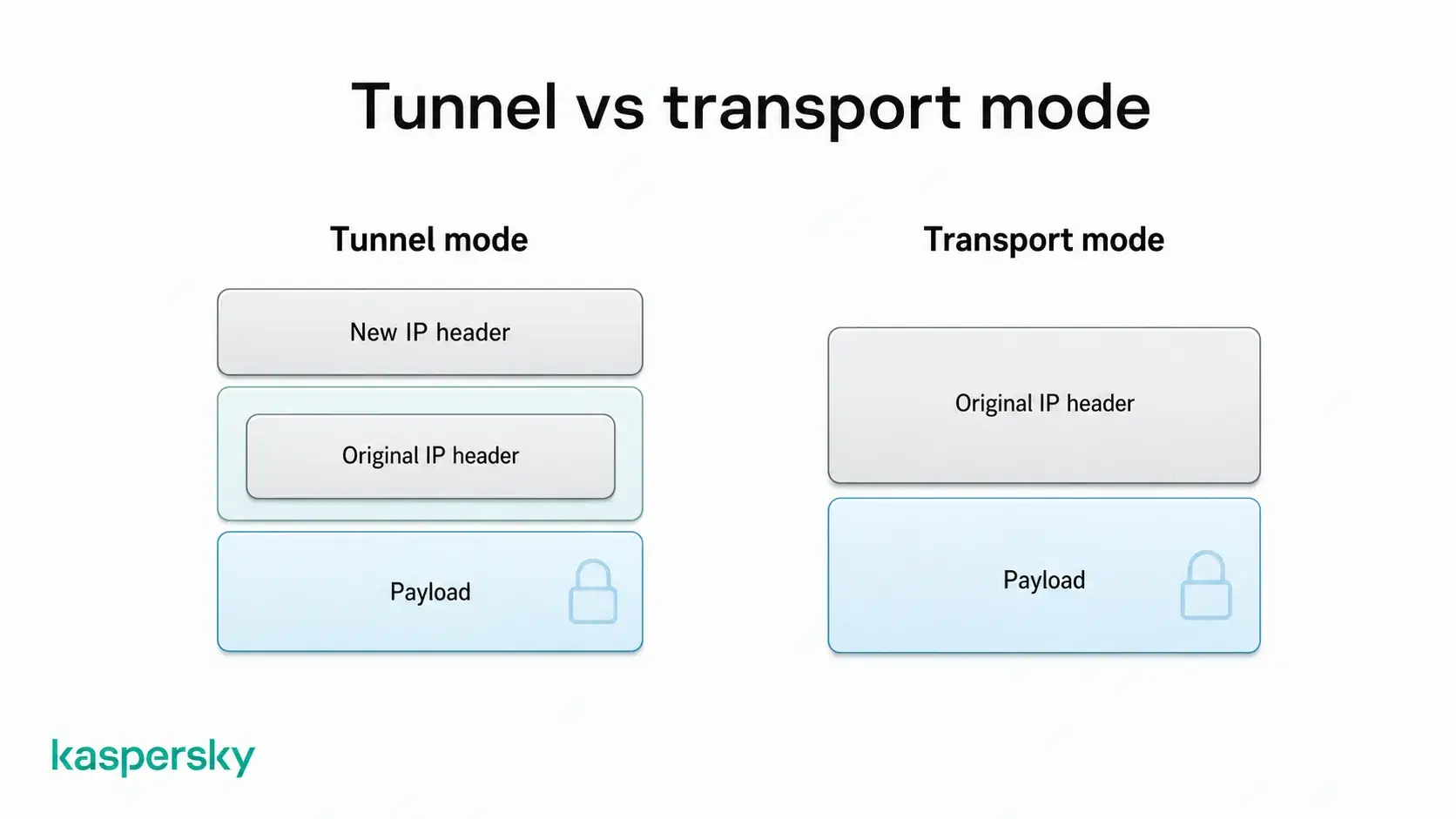
Anyone watching a tunnel-mode connection sees traffic moving between the two endpoints, not the addresses hidden inside. In transport mode, the source and destination stay in plain view, since only the payload is encrypted.
|
Tunnel mode |
Transport mode |
|
|
Protected data |
The entire original IP packet |
The packet payload |
|
IP header |
Original header encapsulated, new header added |
Original header kept and visible |
|
Typical use |
VPN connections between devices and networks |
Direct host-to-host communication |
What are the advantages and disadvantages of IPsec?
IPsec has been deployed since the 1990s, so its trade-offs are well documented.
Advantages of IPsec
- Strong encryption and authentication. Current configurations pair ciphers such as AES with certificate or pre-shared-key authentication, so each end proves its identity before traffic moves.
- Coverage at the network layer. Email clients, file transfers, and backups travel the same protected path as browser traffic.
- Application independence. Software does not have to know a VPN exists, which is why decades-old business applications run over IPsec without modification.
- A published standard. IETF specifications define IPsec, so a firewall from one vendor can usually build a tunnel to a gateway from another.
Disadvantages of IPsec
- Configuration complexity. Dozens of settings have to match at both ends, including encryption algorithms, key lifetimes, and identifiers. A single mismatch can stop a tunnel from coming up.
- Encryption and encapsulation overhead. Every packet gains extra bytes, which can cause fragmentation on links with a smaller MTU.
- Firewall and NAT compatibility. Some networks block the ports IPsec relies on, or handle address translation poorly, which can prevent a connection forming at all.
Without a network engineer on hand, the settings, ports, and NAT behavior are usually the hardest part of getting an IPsec VPN running.
Is IPsec secure?
IPsec is secure when it's configured with current settings, but not every setup is. Older equipment may still be running dated ciphers and an old key exchange version, so protection varies from one connection to the next.
Most current setups pair AES for encryption with HMAC-SHA-2 for integrity. HMAC-SHA-2 produces a short fingerprint of the data using a secret key, so any tampering shows up immediately.
Older setups sometimes still run DES or MD5, neither of which is considered sound now. Some legacy hardware also offers 768- or 1024-bit Diffie-Hellman groups. Diffie-Hellman is how the two ends agree on a shared key without ever sending it, and the group is the size of the numbers they use to do it. Smaller groups provide less protection against attacks, which is why modern configurations use stronger Diffie-Hellman groups instead of the smaller groups found in legacy setups.
Key exchange is the other thing to check. IKEv1, released in 1998, has known weaknesses in certain modes. The worst is aggressive mode, a shortened handshake that trades a round of messages for speed. It gives away enough for an attacker to capture the exchange and then guess at the shared password on their own machine, with no limit on attempts. There is also the risk of a downgrade attack, where someone tampers with the opening negotiation so both ends settle on older encryption they still support. The IETF formally deprecated IKEv1 in 2023, moving it to historic status.
IKEv2 negotiates more safely and is better at rekeying, the scheduled swap to fresh keys partway through a session. It also adds MOBIKE, which keeps an established tunnel running when your device's IP address changes, so a phone moving from Wi-Fi to mobile data stays connected instead of dropping and rebuilding.
As a home user you don't pick these settings yourself. Your VPN app or your employer's IT team does. What matters is that the software is current and still getting updates, since that's what keeps the ciphers and key exchange modern.
Independently tested and awarded by the industry's leading labs.



What is the difference between IPsec and SSL VPNs?
IPsec can give a device network-level access to a remote network, with traffic routed through the protected tunnel according to the VPN configuration. A browser-based SSL VPN typically provides access to selected resources, such as an internal website.
IPsec works low down, at the network layer, so it can protect everything a device sends. SSL VPNs work higher up, using TLS, the technology that encrypts your connection to a banking site. So when an IPsec tunnel is up, the device behaves as though it were plugged directly into the remote network. A browser-based SSL VPN works the other way around, opening a portal to a defined set of resources such as an intranet page or a single internal application, and the device itself never joins the network. Some SSL VPNs do run a client and carry all traffic like IPsec, so the portal version isn't the only kind.
IPsec needs matching configuration at both ends, even where the client is already built into the operating system, while a browser-based SSL VPN can often run with nothing installed. Its traffic goes over TCP port 443, the same port commonly used for HTTPS traffic, which is widely permitted across networks and firewalls. This can make browser-based SSL VPNs easier to use on restrictive networks, such as hotel or airport Wi-Fi, where IPsec traffic may be blocked.
Related Articles:
- What is a VPN and how does it work?
- How does a VPN keep me safe online?
- What is data encryption?
- How to avoid public Wi-Fi security risks
Related Products:
FAQs
What ports does IPsec use?
IKE runs on UDP 500, and NAT traversal moves the key exchange and the encrypted traffic that follows into UDP 4500. ESP and AH aren't ports at all, they're IP protocols 50 and 51. A firewall must allow these, or the tunnel won't form.
Does an IPsec VPN slow down my connection?
Yes, slightly. Encrypting every packet costs a little CPU, and traffic goes through a VPN server. Most people don’t notice anything while browsing or streaming. Distance to the server adds latency, which affects speed far more than the protocol.
How does IPsec affect MTU and MSS?
IPsec adds roughly 50 to 70 bytes per packet, which can force fragmentation. Administrators clamp the TCP MSS to compensate, but there's no standard figure: it depends on the encryption, whether NAT traversal is active, and the underlying link MTU.
Does IPsec use symmetric or asymmetric encryption?
Both. IKE uses asymmetric cryptography, a Diffie-Hellman exchange, which lets the two ends work out a shared secret without ever sending it. That secret then powers a faster symmetric cipher, usually AES, which protects your traffic.