A remote admin tool ScreenConnect is being distributed through fake websites designed to mimic the official pages of well-known software products. In total, researchers identified more than 90 domains spanning 10 languages, including English, Arabic, Spanish, Chinese, German, Portuguese, and Russian, enabling the attackers to reach a wide range of victims worldwide. The campaign targets both individual users and organizations using Windows.
After detecting an incident through its Managed Detection and Response, Kaspersky uncovered a large-scale campaign in which attackers used fake websites to spread installer archives disguised as popular software, including OBS Studio, DNS Jumper, DS4Windows, Glary Utilities and Bandicam. To drive traffic to these pages, the threat actor also used search engine optimization techniques to place them high in search results.
Across more than 90 identified fraudulent software sites, the same tactic was observed: victims who downloaded what appeared to be legitimate software instead received a hidden ScreenConnect remote administration tool, which gave the attackers persistent access to compromised devices and allowed them to deploy AsyncRAT, an open-source trojan capable of giving them full control over infected systems. Domain registrations linked to this campaign peaked in February 2026; in 2025, the same attacker had used fake websites to disguise malicious installers as games.
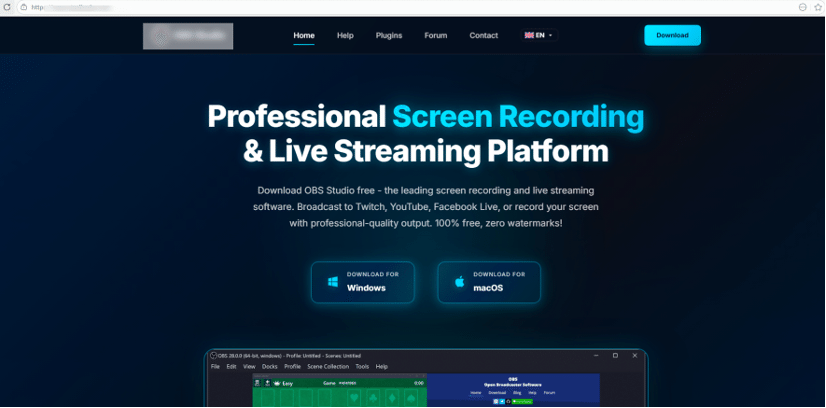 Example of a website
used by attackers to deliver ScreenConnect
Example of a website
used by attackers to deliver ScreenConnect
Infection occurs through malicious archives containing a legitimate, signed Microsoft file, install.exe, alongside the install.res.1033.dll library. The DLL is loaded onto the device via a DLL sideloading technique and deploys a ScreenConnect service that awaits further instructions from the attackers.
“The campaign targets both users downloading free utilities from the internet and corporate networks, where remote access tools are often allowlisted and granted elevated privileges. Its danger lies in its potential to facilitate large-scale credential theft and unauthorized access to systems, with the stolen data typically later resold on dark web forums," says Denis Kulik, lead SOC Analyst at Kaspersky.
The full report is available on Securelist.com
To mitigate the risks associated with this threat, Kaspersky experts recommends that businesses:
Enforce strict software installation controls (application allowlisting, blocking MSI package installations from untrusted sources).
Continuously monitor for new remote administration services and scheduled tasks.
Filter outbound traffic to unknown domains and IP addresses.
Keep your employees informed about relevant threats. Kaspersky Automated Security Awareness Platform helps cultivate cyber-savvy behavior, including safe downloading practices.
Verify the authenticity of software sources.
Augment existing security controls with human-led detection and global threat intelligence through solutions like Kaspersky Managed Detection and Response (MDR), which offers 24/7 monitoring, detection, investigation and rapid response to sophisticated cyberattacks
Monitor credentials for signs of compromise to mitigate risks, as a compromised account or system access can serve as a vector for further attacks on the organization. Kaspersky Digital Footprint Intelligence provides continuous monitoring across open and dark web sources, enabling timely response to potential threats.
Kaspersky experts also recommend users to follow this advice:
Be cautious with downloads. Only download software and media from reputable sources. Malicious software can be bundled with legitimate software, especially if downloaded from dubious websites.
Use a strong security solution on all devices, such as Kaspersky Premium. It will warn you about potential threats and prevent infection.
Enable multi-factor authentication and monitor accounts: Activate 2FA on IDs and financial apps and regularly review statements for unauthorized activity.
Check the authenticity of websites. Double-check URL formats and organizations name spellings.


