Kaspersky Threat Research identified multiple fraudulent applications mimicking legitimate crypto wallets on the Apple App Store. Once opened, the apps redirect users to phishing pages which impersonate the App Store and deliver trojanized wallet applications capable of draining cryptocurrency holdings. Kaspersky determined the campaign has been active since at least fall 2025 and attributes it with moderate confidence to the threat actors behind SparkKitty.
The 26 fraudulent applications Kaspersky identified each mimicked a popular crypto wallet, replicating icon visuals and using similar app names to deceive users:
- Metamask
- Ledger
- Trust Wallet
- Coinbase
- TokenPocket
- imToken
- Bitpie
While official iOS apps for these cryptowallets are not available in the Chinese iOS App Store, almost all phishing applications that were detected were available only to Chinese iOS users. However, the malicious apps themselves have no regional restrictions, so victims outside China could also be affected. Kaspersky reported all malicious applications to Apple.
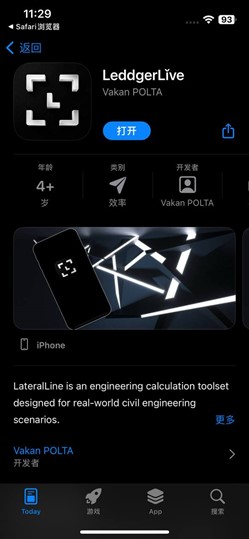
A phishing app mimicking Ledger on the App Store
These phishing apps feature stub functionality — such as games, calculators, to-do-list managers — that serve only to make the applications appear legitimate. When downloaded and launched, they subsequently open a webpage that imitates the App Store and invite users to download the desired “app” for managing crypto again.
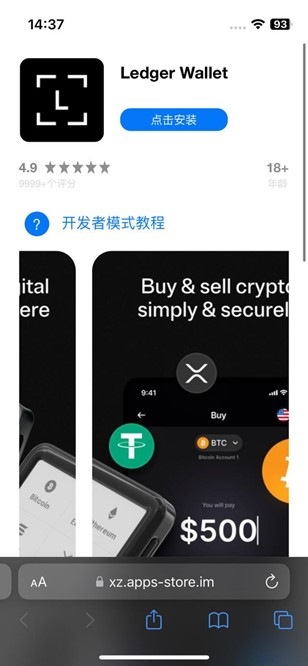
A web page imitating the App Store inviting to download Ledger Wallet
The installation process is similar to SparkKitty, the iOS malware Kaspersky described before – through special developer tools for distributing corporate business applications. The goal here is to confuse the user, as the attackers count on the users not paying attention and adding a developer profile to their device which then allows for a malicious app to be downloaded.
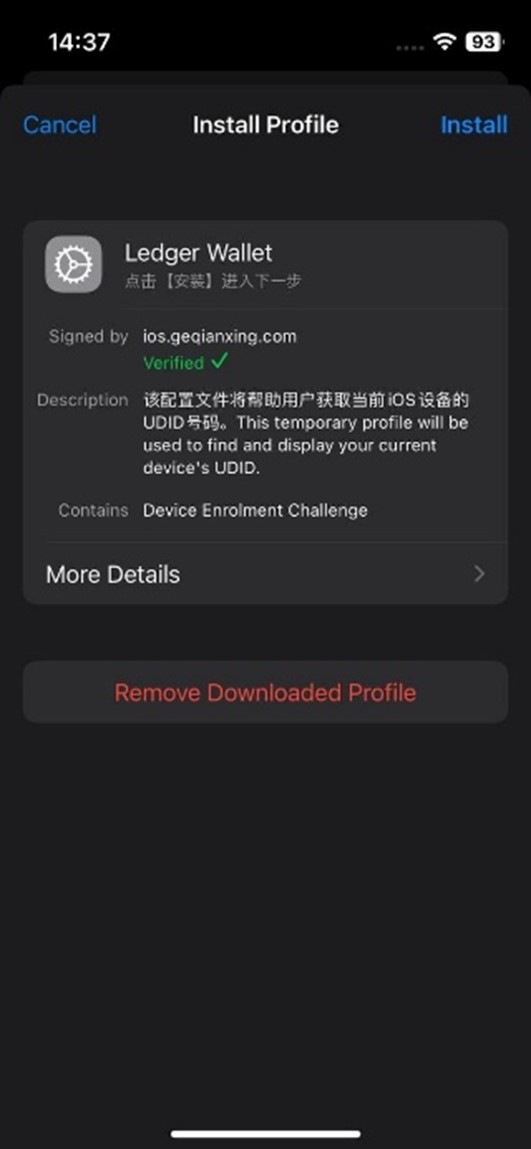
The victims allow a developer profile to be installed on their device, which in turn allows installing apps from outside the App Store – including malicious apps
As a result, a trojanized crypto wallet app gets installed. The malicious apps Kaspersky identified are each adapted to the specific wallet they impersonate and target both hot and cold wallets.
A hot wallet stores private keys on the same internet-connected device where it is installed, making it convenient for frequent use but more vulnerable to attack. A cold wallet, by contrast, is a dedicated hardware device that keeps private keys entirely offline, trading some convenience for significantly stronger security. With hot wallets, the malware intercepts the wallet recovery/creation screen monitoring for seed phrases, and – if it is provided – the attackers get full access to victims’ funds.
With cold wallets, the tactic is different. For instance, the Ledger crypto wallet service offers a frontend application which is the Ledger Wallet smartphone app, and a cold wallet on a separate hardware device that only signs transactions when physically connected or paired via Bluetooth to a smartphone with the Ledger Wallet app. The original Ledger wallet smartphone app would never ask for the seed phrase, as it is stored in the so called ‘cold’ wallet on a separate hardware device; however, the malicious app relies on phishing and tries to get the seed phrase from the user.
“While the apps that kick off the attack chain are not inherently malicious, they lead to the user installing a trojan in the end. By paying a fee and setting up a developer account, the attackers can target any iOS device if the user succumbs to the phishing tactic. Users should be wary of the risks related to managing their crypto wallets even on devices that they consider safe, such as iPhones. We expect there may be more trojanized crypto apps distributed with a similar tactic,” comments Sergey Puzan, mobile malware expert at Kaspersky.
Detailed information is available on Securelist.com.
Kaspersky recommends the following to stay safe:
- Be cautious when following links from inside the apps, especially when a page appears unexpectedly
- Do not install developer profiles unless provided to you by your employer
- Make sure you fill in your recovery phrase only on your wallet device – for instance, the original Ledger Wallet app will never request it
- Always check if the app you’re installing is from legitimate publisher – even when it’s downloaded from the App Store. It’s a good habit to check download links on official developer website.
About Kaspersky Threat Research
The Threat Research team is a leading authority in protecting against cyberthreats. By actively engaging in both threat analysis and technology creation, our TR experts ensure that Kaspersky’s cybersecurity solutions are deeply informed and exceptionally potent, providing critical threat intelligence and robust security to our clients and the broader community.


