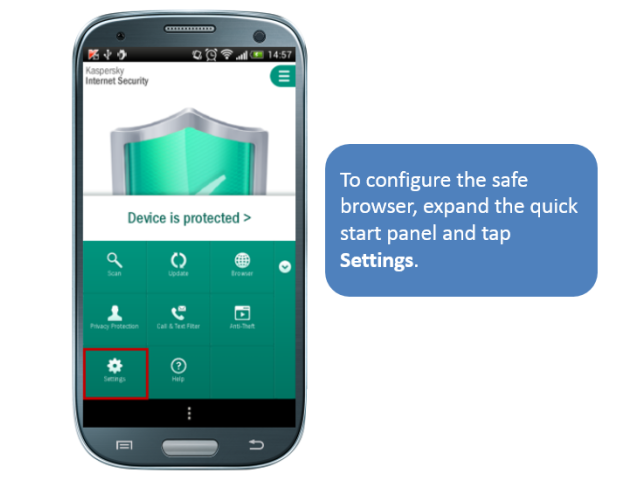
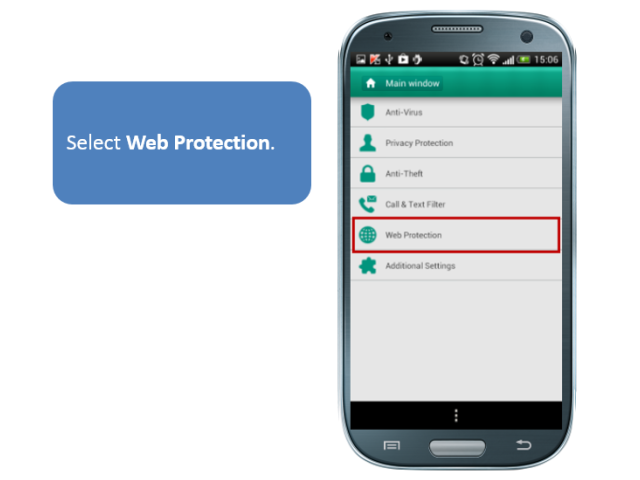
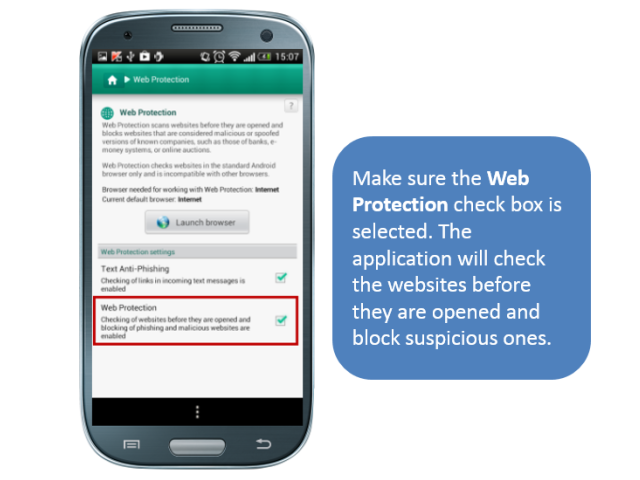
Step-by-Step: How to Use the Safe Browser on Android

Prevent kids from visiting the wrong sites or installing unwanted apps on your smartphone – use the safety features of Kaspersky Internet Security for Android.

If your kids often borrow your phone to surf the Internet, you need to think about the safety and security of their actions. Lacking user experience, they can follow dangerous or phishing links.

With Kaspersky Internet Security for Android, you can run a special browser that allows the opening of safe sites only.

Jump to slides

webfilter_EN

Setting up safe browsing

Protect your smartphone now!

QR-codes

Tips

Cracked in under a minute: (nearly) every other password

We’ve revisited our study on the crackability of real-world passwords leaked on the dark web — originally conducted two years ago. The findings are sobering: nearly every other password can be cracked in under a minute, and three out of five take less than an hour. How can we move away from insecure passwords?