 scam
scam

You open a website. Your browser doesn’t flag any warnings, the design looks perfectly legitimate, the connection is secure, and there are no obvious signs of phishing. Does that mean the site is safe? Unfortunately, many websites fall into a gray area: not quite scams you could point to and call phishing, but risky enough that interacting with them can still cost you your money or data.
This post shows you how to recognize scam websites that your browser mistakes for safe ones, and how to protect your data.
How gray-area websites trick users
Classic phishing sites typically disguise themselves as well-known services to steal users’ money, personal information, or account details. Sites in this uncertain gray area, on the other hand, tend to work differently: they’re not outright fakes — just untrustworthy. They might charge users for services that don’t exist or don’t have the advertised quality, offer deals that look too good to be true and then quietly change the terms later, or promote shady financial schemes.
What’s more, these sites don’t always break the law. Sometimes their operators deliberately look for loopholes in regulations, or bury the actual terms of service where users won’t notice them.
Below, we look at the types of sites and web services that most often fall into this gray area.
Subscription aggregators
Among the most common types of gray-area sites are those selling cheap subscriptions to all kinds of services: streaming platforms, personality tests, online courses, you name it. The victim signs up for a subscription for next to nothing — sometimes literally a dollar — only to discover a week later that renewal costs a shockingly large amount. Technically, there was a warning, but it was buried in the microscopic print at the very bottom of the page. Sometimes scammers take it a step further: they add a line to the terms of service stating that subscription charges are non-refundable. Unsurprisingly, the user then has to jump through all kinds of hoops to cancel the subscription.
Online stores
The classic scam websites. The amazing deals they promote might get the buyer a knockoff, or worse — a printed photo of the item, or a tiny version of it instead of the real thing. And that’s assuming anything shows up at all given how suspiciously low the price was to begin with.
Unfortunately, a bad purchase isn’t where the problems end. Scam online stores are also after personal information: to arrange delivery, the user typically has to hand over their real name, address, phone number, and email. And if the visitor goes ahead and pays for the order, an untrustworthy site can just as easily steal their card details too. Criminals then turn around and sell all of this valuable information on the dark web, or use it to send spam or launch targeted phishing attacks.
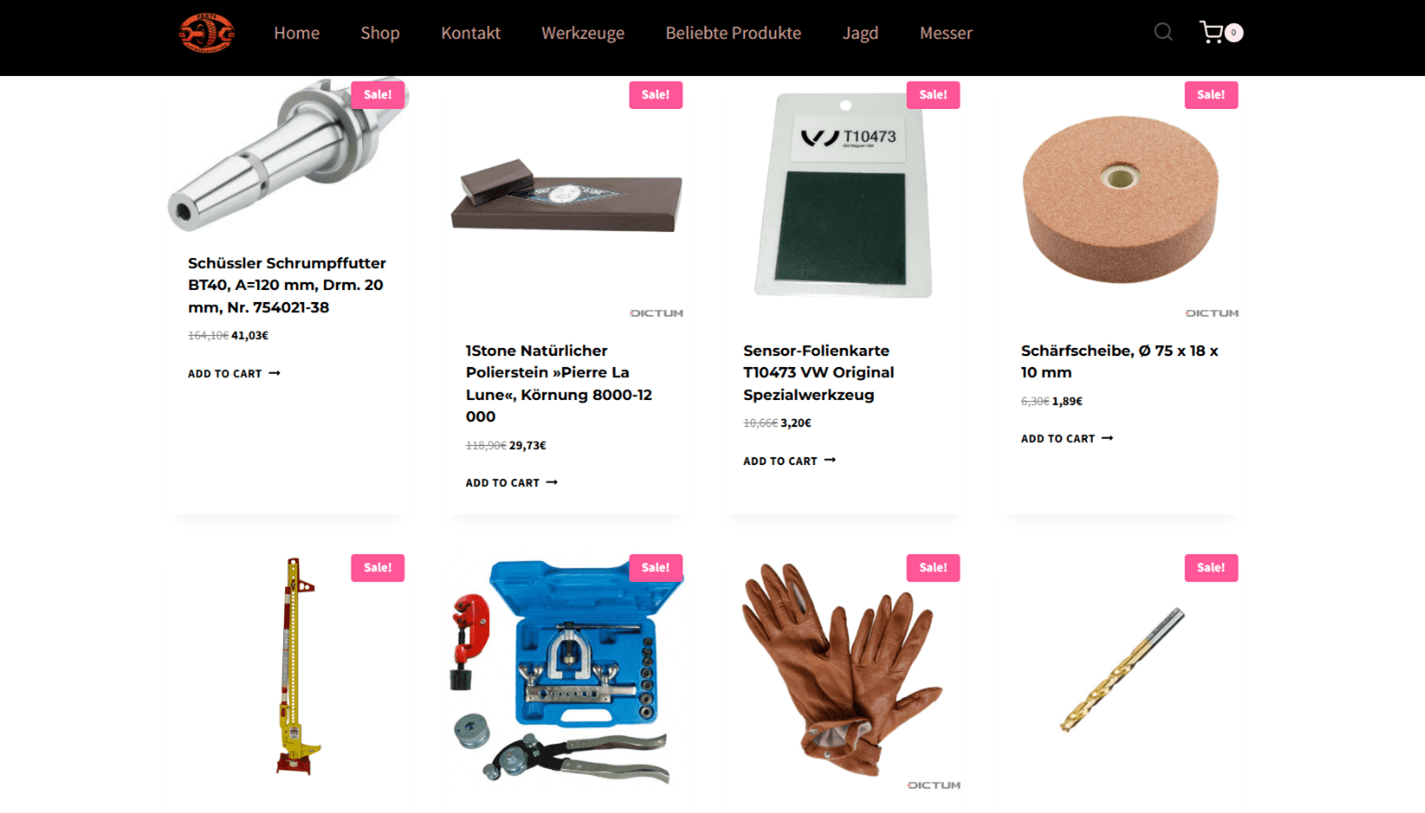
Scammers running a shady online store offer items for next to nothing
Online trading platforms and exchanges
Crypto exchanges and websites offering investment opportunities deserve a separate mention. They all promise a fast return or a suspiciously good exchange rate, but as soon as the victim decides to invest, it becomes clear there’ll be no profit to be had. Quite the opposite, in fact: they lose everything they invested.
Sometimes scammers keep the illusion going by showing the user the balance supposedly growing on their account, but when they try to withdraw their money, it turns out they first need to pay a “fee” or a “tax”, which is how the victim ends up losing even more.
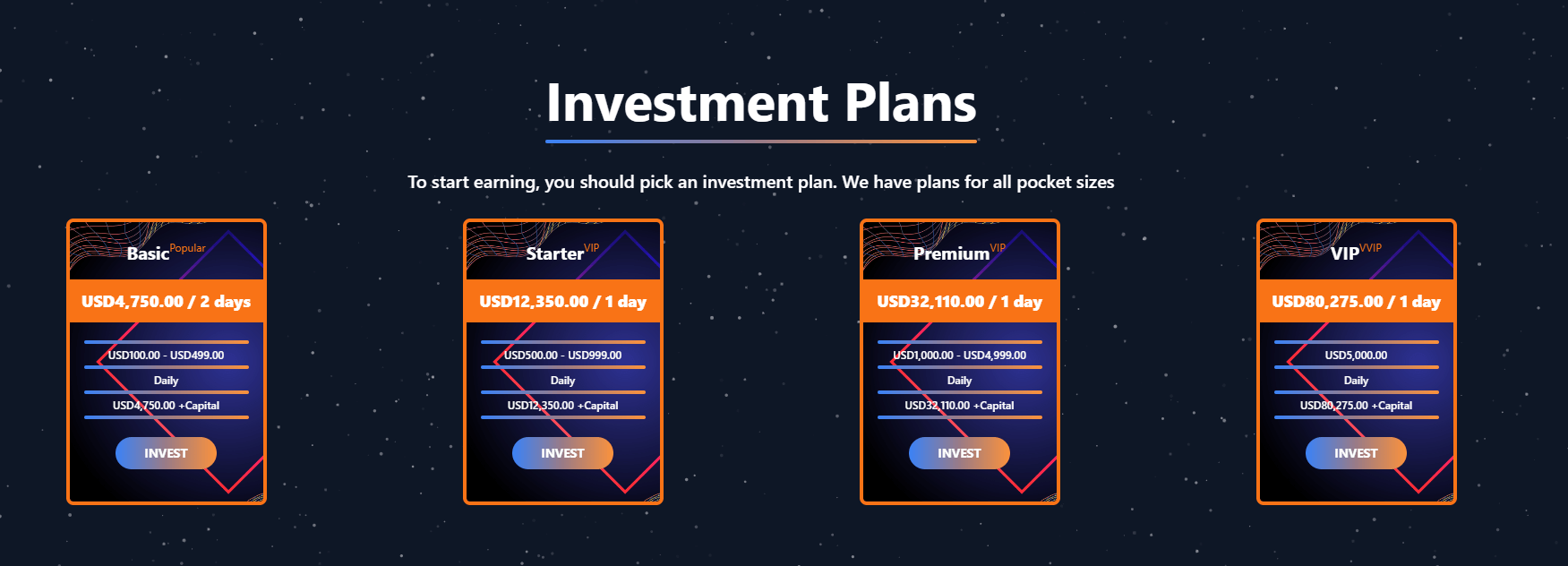
A scam website invites visitors to choose an investment opportunity promising suspiciously high ROI in just one or two days. Invest between US$100 and US$500, the scammers claim, and walk away with almost US$5000 in profit!
Losing money isn’t the only risk here. Among the sites we’ve found, some stole private keys and crypto wallet accounts, while others redirected users to phishing pages, or hijacked their browser sessions.
Remember this: if a site only accepts payment in cryptocurrency, bank transfer, or through some third-party service, treat that as a serious red flag. Payments like this are often difficult or impossible to dispute or reverse. And for cryptocurrency owners, there’s one more rule to keep in mind: never share your seed phrase (the unique master key to your crypto wallet) with anyone.
Middleman services
Gray-area sites also often pose as middlemen, charging money for services that are actually much cheaper or even completely free elsewhere.
In 2025, several scam websites came to light that offered help applying for the UK’s ETA travel authorization. While the official fee is just £16, some of these middlemen charged applicants up to €200 — even though all they were actually doing was forwarding the application to the government service.
Some schemes get more dangerous. Scammers may pose as real estate agents or immigration lawyers, collect clients’ personal information, and then demand payment for supposedly processing documents. Anyone who turns to one of these fake middlemen risks more than just overpaying or getting nothing in return: these customers may also end up handing over sensitive personal details straight from their documents.
What makes this worse is that some of that information, like a taxpayer ID or Social Security number, isn’t easy to change, and sometimes can’t be changed at all. Criminals can use these details to take out loans in the victim’s name, or to break into government online services and hijack their accounts.
Fake protective extensions
Fake browser extensions deserve special attention. They disguise themselves as antivirus tools, ad blockers, search-engine add-ons, or privacy-boosting services. According to our experts, these extensions are one of the most common types of gray-area resources out there.
Once installed, one of these fake protectors can change the victim’s browser and search engine settings, extract their browsing history and search queries, and redirect them to a phishing page. Some of these extensions also intercept cookies (including session cookies), which can help scammers hijack the victim’s accounts.
Don’t be too quick to trust or grant access to any extension that promises protection or privacy. Unfortunately, glowing reviews and high download numbers aren’t a reliable sign that an extension is actually safe. Instead, install one of our security solutions: in addition to providing comprehensive device protection, they include the Kaspersky Protection browser extension. This extension, which works with all major browsers, detects and blocks attempts to collect data on your online activity, finds and blocks pop-up ads on websites, and prevents you from landing on phishing sites or having your data intercepted. On top of that, whenever you make an online payment, the extension opens the site in Protected browser mode for extra security around your financial information and transactions.
How to tell if a website can be trusted
Watch for red flags
- No information about the site or company anywhere online. A legitimate business has a registered address, support contacts, and active social media accounts with some history behind them. Search online for reviews of the site or company. If you can’t find anything, or if the reviews you do find all sound suspiciously alike, that’s a telltale sign you shouldn’t hand over your personal information or money.
- You’re being rushed. Watch for pop-up messages like “Only 2 items left!”, “Discount expires in 10 minutes!”, or “100 people are viewing this right now”, or a countdown timer ticking away on the page.
- Deals that are too good to be true. If someone’s promising easy money in just a few days, or a product at an unbelievably low price, that’s a good reason to pause and ask yourself whether you’re being scammed.
- Sloppy website design. Sites thrown together in a hurry often have page elements that don’t line up properly, typos, badly translated text, or buttons and links that simply don’t work. That said, a slick page design isn’t proof of trustworthiness either: these days, scammers can use AI to build a convincing site from scratch.
- Strange-looking product photos. Sketchy online stores often use blurry or pixelated photos, or AI-generated images.
- Copying known companies and brands. Fake websites copy logos, colors, photos, and overall design, hoping visitors will mistake them for the real thing.
Deploy a robust security solution
Kaspersky Premium automatically filters out websites with an uncertain trust level by default. It checks several site characteristics at once: the domain name and how long it’s been registered, the reputation of its IP address, how stable its infrastructure is, its DNS settings, security headers, and certificate. If enough of these attributes look suspicious together, the security solution displays a warning instead of opening the site right away.
On top of that, Kaspersky Premium blocks attempts to trick you into giving up your logins, passwords, or payment information on fake pages. It also detects and neutralizes harmful software on your device.
More on phishing and scams:
 Tips
Tips