 infostealers

News outlets recently reported that a threat actor was spreading an infostealer through free 3D model files for the Blender software. This is troubling enough on its own, but it highlights an even more serious problem: the business threat posed by free open source programs, uncontrolled by corporate infosec teams. And the danger comes not from vulnerabilities in the software, but from its very own standard features.
Why Blender and 3D model marketplaces pose a risk
Blender is a 3D graphics and animation suite used by visualization professionals across various industries. The software is free and open-source, and offers extensive functionality. Among Blender’s capabilities is support for executing Python scripts, which are used to automate tasks and add new features.
The package allows users to import external files from specialized marketplaces like CGTrader or Sketchfab. These platforms host both paid and free 3D models by artists and studios. Any of these model files potentially contain Python scripts.
This creates a concerning scenario: marketplaces where files can be uploaded by any user and may not be scanned for malicious content, combined with software that has an Auto Run Python Scripts feature. It allows files to automatically execute embedded Python scripts immediately upon opening — essentially running arbitrary code on the user’s computer in unattended mode.
How the StealC V2 infostealer spread via Blender files
The attackers posted free 3D models with the .blend file name extension on the popular CGTrader platform. These files contained a malicious Python script. If the user had the Auto Run Python Scripts feature enabled, downloading and opening the file in Blender triggered the script. It then established a connection to a remote server and downloaded a malware loader from the Cloudflare Workers domain.
The loader executed a PowerShell script, which in turn downloaded additional malicious payloads from the attackers’ servers. Ultimately, the victim’s computer was infected with the StealC infostealer, enabling the attackers to:
- Extract data from over 23 browsers.
- Harvest information from more than 100 browser extensions and 15 crypto wallet applications.
- Steal data from Telegram, Discord, Tox, Pidgin, ProtonVPN, OpenVPN, and email clients like Thunderbird.
- Use a User Account Control (UAC) bypass.
The danger of unmonitored work tools
The problem isn’t Blender itself — threat actors will inevitably try to exploit automation features in any popular software. Most end-users don’t consider the risks of enabling common automation features, nor do they typically dive deep into how these features work or how they could be exploited.
The core issue is that security teams aren’t always familiar with the capabilities of specialized tools used by various departments. They simply don’t account for this vector in their threat models.
How to avoid becoming a victim
If your company uses Blender, the first step is to disable the automatic execution of Python scripts (Auto Run Python Scripts feature). Here’s how to do it according to official documentation.
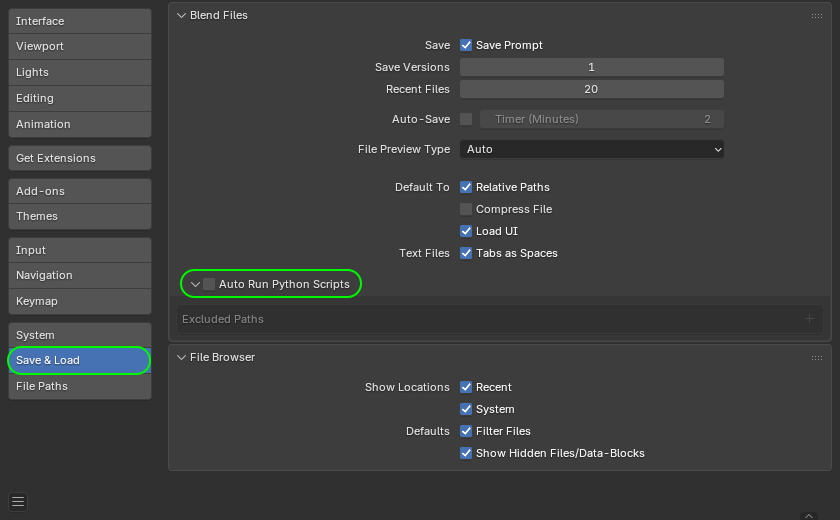
How to disable the automatic execution of Python scripts in Blender. Source
Furthermore, to prevent the sudden spread of threats via work tools, we recommend that corporate security teams:
- Prohibit the use of tools and extensions that haven’t been approved by the security team.
- Thoroughly vet permitted software, and assess risks before implementing any new services or platforms.
- Regularly train employees to recognize the risks associated with installing unknown software and using dangerous features. You can automate security awareness training with the Kaspersky Automated Security Awareness Platform.
- Enforce the use of secure configurations for all work tools.
- Protect all company-issued devices with modern security solutions.

 Tips
Tips